You’ve got a list of promising prospects, a LinkedIn inbox that needs attention, and a tool offering to handle connection requests and follow-ups while you work. The appeal is obvious. The difficult question is whether you’re automating preparation or handing software control of an account your business can’t afford to lose.
LinkedIn message automation works best as a component-by-component decision, not a daily sending target. Automate qualification, drafting, and coordination where the permissions allow it. Treat anything that logs in, collects platform data, or acts in your name as a separate risk decision.
Table of Contents
- Which Parts of LinkedIn Automation Are Safe to Run
- How to Build a Trigger-Based Outreach Workflow
- Writing Messages Around a Specific Trigger
- Sequencing and Pacing Your Follow-Ups
- Measuring Whether Automated Outreach Works
- Recovering From a Restriction or Enforcement Change
- Start a Two-Week Pilot Before Scaling
Which Parts of LinkedIn Automation Are Safe to Run
Automation around the send is easier to defend than automation that acts on LinkedIn in your name. These are relative risk categories, not a guarantee that every implementation is permitted.
Automation components by account risk
| Component | Example | Risk level | Guardrail |
|---|---|---|---|
| Signal monitoring | Tracking posts, comments and role changes | Low | Use permissioned or public data through compliant collection methods |
| Lead scoring and enrichment | Matching profiles against the ICP | Low | Record the reason behind each score |
| Message drafting | Writing trigger-based first lines | Low | A human reviews every draft before use |
| CRM synchronization | Pushing replies and stages to the CRM | Low | Limit access to the fields you need |
| Reminders and task creation | Alerts telling a rep to follow up | Low | Keep the send manual |
| Message sending | Automated connection requests and direct messages | High | Use manual execution or an integration authorized for that specific action |
| Browser scraping or automated logins | Extensions that read or act on the page | High | Avoid prohibited scraping and automated account access |
| Automated engagement | Auto-liking or auto-commenting | High | Avoid automated engagement that violates authenticity rules |
Judge the action, not the daily limit
LinkedIn’s prohibited-software guidance says third-party software or extensions that scrape data, modify the site, or automate activity violate its terms, and instructs restricted members to disable such software. That makes a tool’s execution method more important than its promise to look human.
Publicly visible doesn’t mean freely scrapable. Signal monitoring belongs in the lower-risk category only when the collection method is permitted. Likewise, approving a draft doesn’t authorize an extension to click Send through a prohibited mechanism.
The audience is already substantial: LinkedIn’s July 2025 company update reported 1.2 billion members worldwide. For an outbound team, the useful response to that scale is tighter filtering, not a larger queue.
Use LinkedIn connection request limits as an operational consideration, not proof that activity below a particular limit is compliant. A modest campaign can still use a prohibited method.
Practical rule: If a component touches your account directly, assign a named reviewer and verify that the execution method itself is permitted.
For a business-critical executive account, compare any incremental conversations with the consequences of losing access to its established network. Saving prospecting time isn’t a good trade if the account becomes unavailable.
How to Build a Trigger-Based Outreach Workflow
Start with the evidence that justifies contact, then decide how a message reaches the prospect. LinkedIn’s automated-activity guidance warns that automated inauthentic activity can result in temporary or permanent restrictions, so the workflow needs execution controls before it needs scheduling logic.
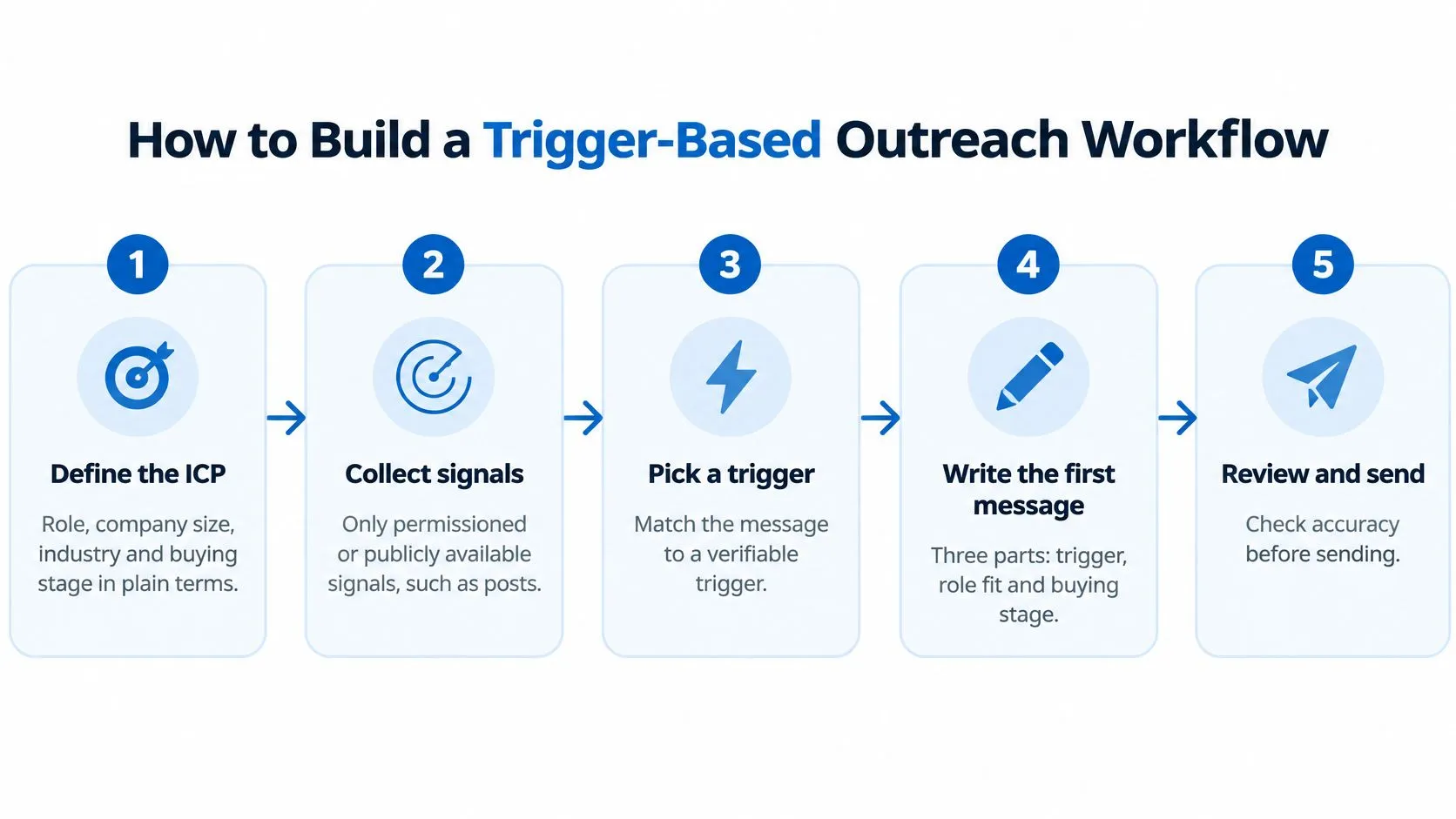
The flow below summarizes the preparation and review stages.
Turn activity into reviewable tasks
-
Define the ICP in plain language. Specify the buyer’s role, company size, industry, and buying stage, including exclusions such as existing customers or unsupported markets. The common slip is describing everyone who could use the product rather than people your team can realistically qualify.
-
Collect permissioned or publicly available signals through compliant means, such as relevant posts, comments on your content, role changes, and competitor discussions. Don’t turn a public comment into permission for unrestricted collection or outreach.
-
Normalize every event into a timestamped record. Store the person, company, event type, originating context, and collection method so the reviewer can reconstruct what happened. An imported job change without a trustworthy timestamp shouldn’t be described as recent.
-
Require corroborating signals before creating an outreach task. Combine role fit with relevant behavior and company context, rather than treating a single like as purchase intent.
-
Make the draft traceable to the trigger. Save the observation behind the opening line and distinguish what the prospect said from your interpretation. The failure point is allowing the writer to turn engagement with a topic into an invented operational problem.
-
Route the proposed message through a named reviewer, then use manual sending or an integration explicitly authorized for that action. Don’t let a drafting tool become a sending tool, and don’t confuse customer authorization with platform authorization.
-
Stop the sequence when a reply, opt-out, or negative sentiment arrives. Give a person ownership of interpreting ambiguous responses before anything else goes out. A reply awaiting classification must not leave the prospect eligible for another queued follow-up.
For account prioritization, Trefle.ai’s French-language guide to prioritizing accounts ready to buy provides useful context on purchase signals. Apply the same distinction in intent-based marketing: evidence should change who gets attention, not merely decorate a message.
Keep qualification separate from execution
In our workflow, each lead is enriched, matched against the customer’s ICP, and scored; only high-intent profiles are engaged automatically. We continuously monitor signals including engagement with the customer’s content or team, profile visits, and interactions around relevant topics or companies.
Those qualification controls don’t independently establish permission for the sending mechanism. Randomized delays are pacing, not policy compliance.
Keep an audit log containing sender, target, trigger, message version, delivery status, reply, and restriction events. Timestamp each entry and preserve the approval record, so the team can explain both why it contacted someone and how the action occurred.
Writing Messages Around a Specific Trigger
A prospect comments on your post about falling outbound reply rates. Your draft opens with a generic introduction about helping sales teams grow, ignoring the reason this person entered the queue. You’ve collected context without using it.
The useful drafting model connects the trigger to buyer fit and buying stage.
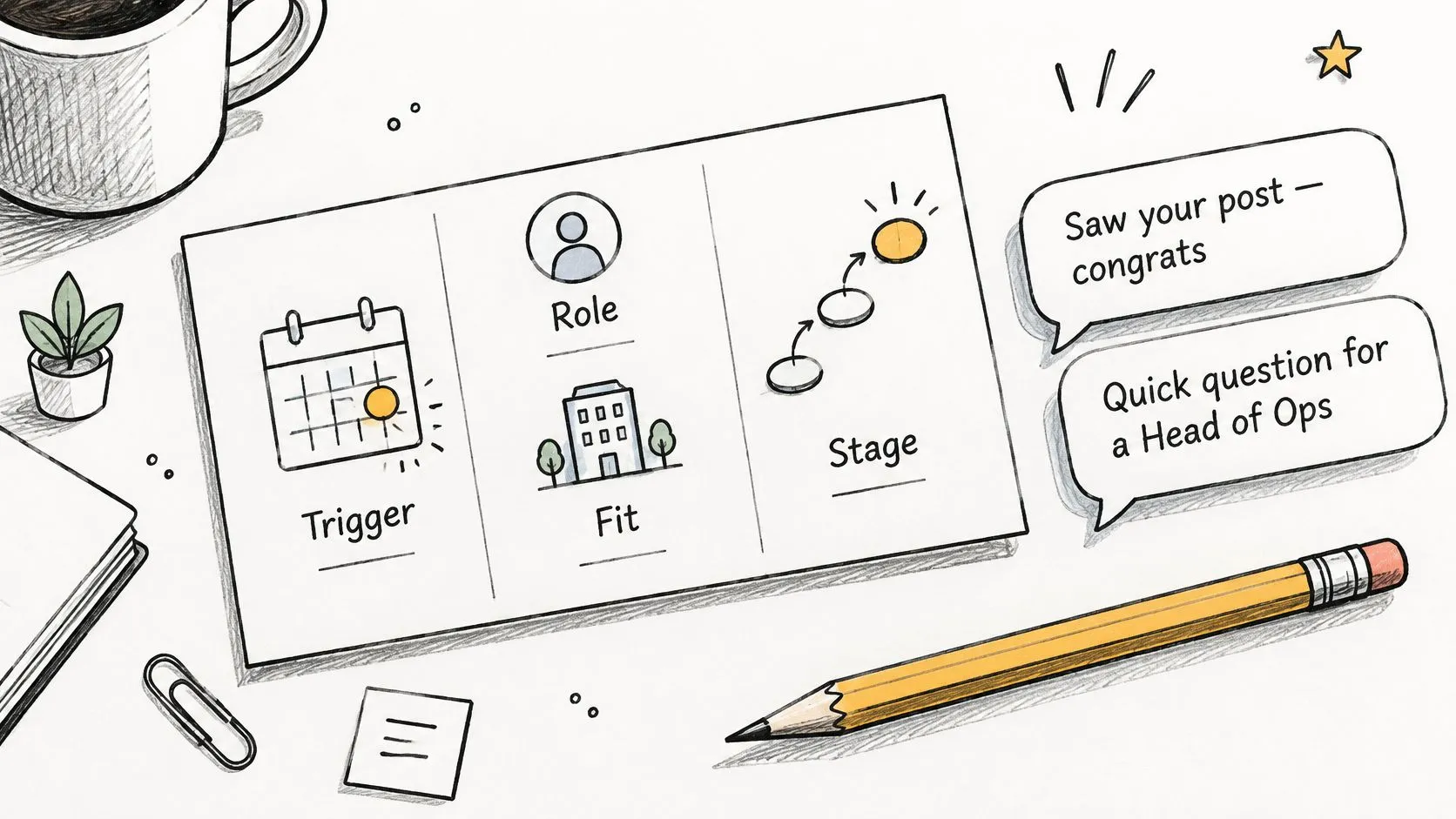
In its April 2025 company update, LinkedIn reported that comments had increased 32% year over year. That creates more observable conversational context, but a comment still doesn’t prove that someone wants a sales conversation.
Match the opening to what happened
A comment about declining replies. Say a sales leader comments that responses dropped after their team expanded targeting. A suitable opening is:
Your comment on the reply-rate post mentioned expanding into a broader audience. Are you reviewing targeting first, or the message itself?
The question follows the prospect’s stated situation. Avoid claiming their entire outbound program is failing or opening with a meeting request.
A new VP of Sales. Say a new sales leader joins a company that fits your ICP and publicly discusses reviewing prospecting. Start with:
Congratulations on the new role. Your post mentioned reviewing prospecting, so is audience selection part of that work?
The role change explains timing, while the post establishes relevance. Don’t assume every newly appointed executive has budget or wants to replace their tools.
Engagement with a competitor’s discussion. Say someone comments on a thread about manual lead qualification. Try:
Your comment on the qualification discussion raised the difficulty of separating interest from fit. How does your team make that distinction today?
Avoid implying that they use the competitor’s product. Commenting on a discussion proves participation, not a commercial relationship.
This accompanying video offers another way to think about the outreach approach.
A generic template could go to anyone with the same job title. A trigger-based message contains an observation that belongs to this recipient, explains its relevance, and asks for nothing more than a reply.
Review every template before launch and every generated claim before use. If the trigger doesn’t support a clear reason to contact someone, drop the task rather than softening an irrelevant pitch.
Sequencing and Pacing Your Follow-Ups
Follow-up cadence and stop conditions
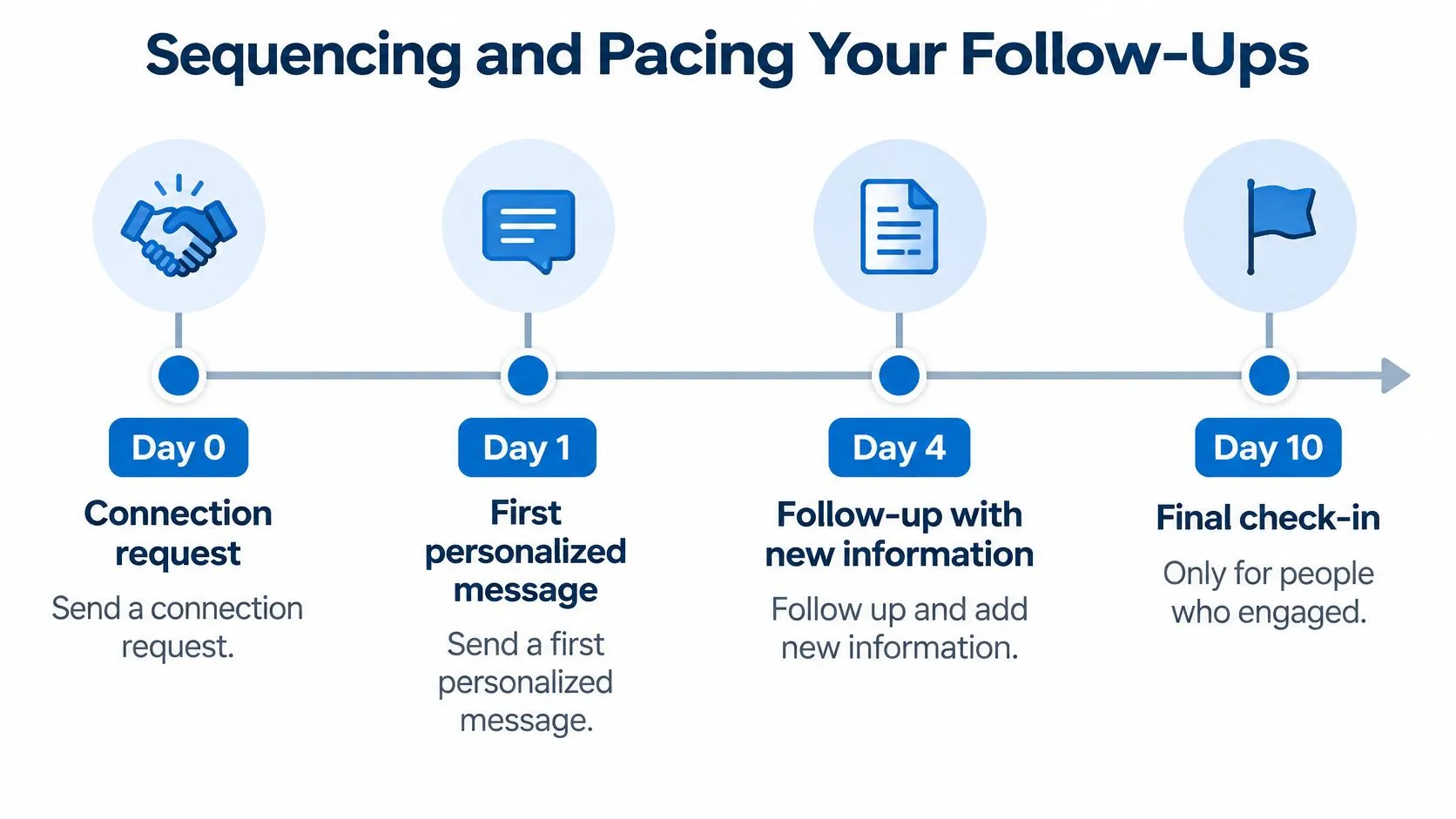
Treat this as an illustrative schedule for a permitted, human-reviewed workflow, not a LinkedIn-approved sending allowance. Later steps require an accepted connection and continued eligibility.
| Day | Action | Stop condition |
|---|---|---|
| Day 0 | Connection request with a short note tied to one signal | Stop if the request is ignored or declined |
| Day 1 | First personalized message tied to the same signal | Stop on reply, opt-out or negative sentiment |
| Day 4 | Follow-up that adds new information, not a repeated ask | Stop after two follow-ups without engagement |
| Day 10 | Final check-in only for prospects who engaged | Stop permanently after this message |
An ignored request stays out of the message sequence; the calendar doesn’t override the missing connection. A reply ends automation and starts human handling, while an opt-out or negative response ends promotional follow-up.
The no-engagement rule is an outer ceiling, not a requirement to send additional messages. The final check-in applies only where an engagement signal exists and no reply requires human handling.
The timeline makes those proposed checkpoints easier to review.
Test relevance before increasing activity
The first message should connect to a verified observation. The next should contribute something useful, such as a diagnostic question or a relevant explanation, rather than ask whether the prospect saw the previous message.
A follow-up earns its place by adding information, not by reaching its scheduled date.
Keep a control message and change a single variable across comparable ICP groups: trigger specificity, opening line, call to action, or spacing. Allow recipients a comparable opportunity to respond before judging a variant.
An outreach analysis cited in LinkedIn Learning’s guidance reported response-rate increases of 30.5% for personalized subject lines and 32.7% for personalized message bodies. Those email findings are directional hypotheses, not LinkedIn-message benchmarks.
For a useful comparison of how follow-ups contribute new value, MailAdept’s Cold Email Sequence Structure explains sequence design. Borrow the logic, not email channel assumptions.
Schedule review and permitted sends around the prospect’s working hours and time zone. Avoid sender-level bursts, and reduce activity when acceptance deteriorates so the team can inspect targeting and message quality before continuing.
Measuring Whether Automated Outreach Works
Metrics that show real outreach performance
| Metric | What it shows | Blind spot |
|---|---|---|
| Trigger-to-relevant-reply rate | Relevant replies attributable to a specific signal | Replies can still be polite but unqualified |
| Qualified-conversation rate | Conversations that meet your ICP and need criteria | Requires a consistent qualification rule |
| Meeting-to-opportunity conversion | Whether meetings become real pipeline | Appears later than initial replies |
| Opportunity win rate | Whether sourced opportunities close | Small early samples can mislead |
| Unsubscribe or negative-response rate | Buyer tolerance for your outreach | Often underreported in dashboards |
| Time-to-human-handoff | Speed from reply to rep follow-up | Fast handling can’t fix an irrelevant opening |
| Revenue per sender | Commercial output of each LinkedIn account | Can conceal account-level restriction risk |
Pause a variant when negative responses or opt-outs rise, even if total replies improve. Promote a trigger into the main workflow only when it improves qualified conversations against a comparable control without worsening buyer feedback.
That decision requires a written definition of qualified. For example, require role and company fit, a relevant acknowledged need, and willingness to continue the discussion. A courteous refusal isn’t a qualified conversation.
Compare audiences, not just campaigns
Run signal-selected prospects against a comparable broad-list control, subject to the same review and suppression rules. Keep role, company fit, offer, and sender characteristics as similar as practical so you’re testing the value of the signal rather than unrelated audience differences.
Split results by trigger type and sender. A campaign average can conceal a strong problem-specific comment trigger alongside a weak role-change trigger, or a sender whose network accounts for most positive responses.
LinkedIn’s B2B buyer guidance favors relevant, customized communication over generic pitches. Measure that relevance through qualification and buyer feedback, not the presence of a personalized opening line.
Preserve the evidence behind the dashboard
Use timestamped event records to connect the original trigger, approved message, delivery outcome, and eventual opportunity. Keep suppression status available wherever tasks are created, and reconcile updates through your LinkedIn CRM synchronization workflow.
Measurement discipline: Count a negative reply as buyer feedback, not a campaign win.
Assign someone to review ambiguous replies and disputed qualification decisions. Otherwise, different reps will classify the same conversation differently, and the dashboard will reflect inconsistent judgment rather than outreach quality.
Recovering From a Restriction or Enforcement Change
A restriction notice or verification prompt is a reason to stop and investigate, not to adjust delays and try again. Follow the account-specific instructions before attempting normal activity.
Contain the problem before restarting
-
Disable automated and scripted activity immediately. Disconnect implicated third-party tools and preserve the notice, including its wording and timestamp.
-
Export the available event history leading up to the notice. Inspect sending patterns, collection methods, message versions, negative responses, and automated engagement without assuming the most recent action caused the restriction.
-
Complete the required verification or appeal process. Don’t treat a self-imposed waiting period as permission to resume, and don’t continue messaging while the account’s status is unresolved.
-
Remove the implicated component before considering a restart. If you can’t establish that its execution method is permitted, leave it disabled rather than testing it on another account.
-
Keep sender ownership separate. Don’t transfer the campaign to another account to work around enforcement; any later reassignment needs an independently permitted workflow and its own approval record.
-
Reassess affected components when LinkedIn changes its rules or enforcement guidance. Record the revised decision, responsible owner, and restart conditions.
Keep recovery actions in the audit log. A restart should require an explicit decision based on account clearance and a corrected workflow, not merely an empty sending queue.
Start a Two-Week Pilot Before Scaling
Use a two-week pilot as an operating experiment, not a promise that pipeline or closed revenue will become measurable within that period. Keep the initial scope narrow enough that a named owner can inspect every proposed first message and every response.
Choose a defined ICP segment and a pair of triggers, such as a substantive comment on your content and a new role accompanied by a relevant public statement. Maintain a comparable broad-list control, with the same qualification standards and execution safeguards.
Write the decision before launch
- Pass condition: The trigger-selected group produces better qualified-conversation results than the control, without worse negative-response or opt-out feedback.
- Stop condition: A restriction notice, increased unwanted-outreach feedback, or mostly polite declines prompts a pause and review.
- Review responsibility: A named person checks the source observation, factual accuracy, recipient eligibility, and permitted sending method.
- Expansion condition: Add another trigger only after the existing audience and message approach justify continued use.
Don’t declare success from a handful of friendly replies. If the comparison is inconclusive, extend observation rather than increasing activity to force an answer.
For our acquisition approach, LinkedIn fits when it’s part of the customer’s strategy and quality matters more than volume. We contact only the best-matched leads, sending fewer messages to start more relevant conversations.
Scale the useful work first
Expand qualification coverage, improve draft accuracy, and shorten human handoff before adding outbound activity. Those changes help the team handle more relevant opportunities without assuming that more account actions are the answer.
Keep the account owner in control of execution and make sure someone can disable the workflow immediately. A tool should make the evidence easier to inspect, not hide the reason a prospect received a message.
This week, choose your ICP segment and write down the pair of triggers you’ll test before opening any automation tool.
LeadBeast detects buying signals, qualifies prospects against your ICP, and supports context-aware outreach and CRM synchronization. Visit LeadBeast to evaluate how its signal monitoring and qualification fit your pilot, and assess the sending method separately before enabling account-level automation.