The most popular advice about LinkedIn connection request limits is also the easiest to misuse: “Stay under 100 requests per week and you’ll be safe.” That number is useful as an operating reference, but it isn’t a universal permission slip. LinkedIn evaluates how an account behaves, not just how many invitations it sends.
One account can send a steady stream of relevant requests without trouble, while another reaches a restriction after much less activity. Acceptance behavior, profile credibility, pacing, invitation history, and the quality of the people being approached all influence the practical ceiling. The operators who stay productive don’t chase a magic threshold. They watch the account’s signals and adjust before LinkedIn has to do it for them.
Table of Contents
- Why the Headline Number Is Not a Guaranteed Allowance
- What LinkedIn Officially Says About Invitations
- The Unofficial Weekly and Daily Ceiling in 2026
- Signals That Quietly Reshape Your Real Limit
- A Safe Scaling Pattern That Holds Up in Practice
- A Week in the Life of a Scaling SDR Account
- Warning Signs, Restrictions, and How to Recover
- Reframing Limits as a Quality Control System
Why the Headline Number Is Not a Guaranteed Allowance
The 100-per-week figure is a practical benchmark, not a guaranteed allowance. Salesforge’s 2026 analysis describes about 100 invitations in a rolling seven-day window for many accounts, while noting that the threshold varies with account history, acceptance behavior, and overall activity. Treat that figure as an observed operating range, not a promise from LinkedIn.
Account behavior changes the outcome. A complete profile, relevant targeting, and a history of accepted invitations can support activity near that range. The same volume sent to poorly matched prospects can reduce an account’s capacity sooner. LinkedIn can change the account’s experience without publishing a new rule.
The same volume can produce different outcomes
Outbound operators regularly see the same account behave differently from one week to the next. A controlled run may pass without friction, while a similar burst later triggers a “You don’t have any invitations left” message. Older invitations that remain unanswered and recent requests that receive little positive response can both contribute to that shift.
This does not establish a permanent personal quota. It shows why a headline number cannot replace account monitoring. A sender that treats the ceiling as a target may spend capacity on weak prospects, then mistake the resulting restriction for a technical fault.
Practical rule: Use the observed weekly range as a guardrail, not as a quota you’re entitled to consume.
Track acceptance behavior, pending invitations, and the consistency of the sending pattern. Watch for sudden interface changes too, such as requests being blocked earlier than expected or an identity check appearing during normal activity.
The useful question is not how many requests the account can send in theory. Ask what level of activity it can sustain while recipients continue to recognize the outreach as relevant. That answer depends on pacing, profile trust, and response quality. Adjust those inputs before the platform forces a recovery period.
What LinkedIn Officially Says About Invitations
LinkedIn’s documented position is broader than a simple weekly number. Its Help Center says the platform limits invitations to protect the member experience and keep requests relevant. When a member reaches the invitation limit, LinkedIn says the account may be temporarily restricted from sending invitations for about one week. LinkedIn’s official invitation guidance is the clearest reference for what the platform explicitly communicates.
The same guidance establishes a long-term network boundary. A member can have a maximum of 30,000 first-degree connections. Once that ceiling is reached, the account can’t keep expanding its first-degree connection graph in the same way. That policy makes the platform’s design clear: LinkedIn treats connections as a curated relationship graph, not an unlimited address book.
Invitation controls are part of the product design
Basic or free members can add a personalized message to only five connection requests per month, according to LinkedIn’s Help Center. Premium members can send unlimited personalized messages with their connection requests. A paid plan therefore changes the messaging allowance, but it doesn’t turn connection sending into an unlimited activity.
The distinction between connection requests and personalized notes is operationally important. A note should explain why the recipient is relevant, not compensate for weak targeting with a generic pitch. Teams that want more practical guidance on writing and managing outreach can also review RedactAI’s LinkedIn networking tips.
Written rules versus observed enforcement
LinkedIn explicitly documents invitation restrictions, the temporary restriction period, personalized-message allowances, and the 30,000-connection cap. Other details discussed by operators, such as the exact point at which acceptance behavior causes a sender’s capacity to tighten, are inferred from observed account behavior rather than published as a universal formula.
That distinction should shape internal policy. Treat LinkedIn’s written guidance as enforceable platform policy. Treat third-party limits as cautious operating assumptions, and leave room below them when an account shows signs of declining trust.
The Unofficial Weekly and Daily Ceiling in 2026
The practical ceiling in 2026 is a planning range, not a fixed rule. For many established accounts, operators work within 80 to 100 invitations per week and roughly 15 to 20 requests per day. These figures reflect third-party observations rather than a LinkedIn guarantee. Salesforge’s 2026 discussion of rolling invitation limits describes the commonly observed weekly range and why pacing matters.
New accounts and recently restricted accounts need a lower starting point. A useful operating guide is 20 to 40 invitations per week and 5 to 10 requests per day, with activity spread across the week. That range is not a platform promise. It is a risk-control baseline for accounts with limited history, recent enforcement, or weak acceptance signals.
The counter is generally treated as rolling rather than calendar-based. A Friday burst still occupies part of the trailing seven-day window when Monday arrives. A new calendar week does not reliably restore full capacity.
Observed Weekly Connection Request Ranges in 2026
| Account Profile | Weekly Range | Daily Ceiling | Risk Profile |
|---|---|---|---|
| New or recently restricted account | 20 to 40 | 5 to 10 | Higher sensitivity to bursts and weak acceptance |
| Established account with consistent behavior | About 80 to 100 | Roughly 15 to 20 | Moderate, depending on relevance and history |
| Account approaching its practical ceiling | Around the upper observed range | Spread activity across the week | Rising risk if requests remain pending or poorly matched |
Use the table for capacity planning, not as a promise of available inventory. Profile trust, invitation quality, and pacing determine whether an account can operate near the upper end. Copying an established sender’s volume onto a newer account can produce warnings sooner.
Team planning should use each sender’s rolling capacity. For example, if a sender uses 30 invitations late on Friday, those invitations still count on Monday. A weekly plan that assumes 20 requests per day may therefore leave less room early in the week, even when the dashboard shows a new calendar week. Track actual sends, pending invitations, warnings, and remaining rolling-window room for every sender instead of assigning one company-wide quota.
Signals That Quietly Reshape Your Real Limit
LinkedIn’s practical ceiling is shaped by the account’s relationship with its audience. Acceptance rate is one of the clearest operating signals because it shows whether recipients recognize the sender as relevant. A profile that attracts consistent acceptance gives the platform a different behavioral pattern from one whose invitations are routinely ignored or rejected.
That doesn’t mean teams should reduce account health to one percentage. A strong acceptance pattern can’t fully compensate for suspicious bursts, incomplete profiles, or a large backlog of unanswered invitations. The useful approach is to treat each signal as part of a wider trust picture.
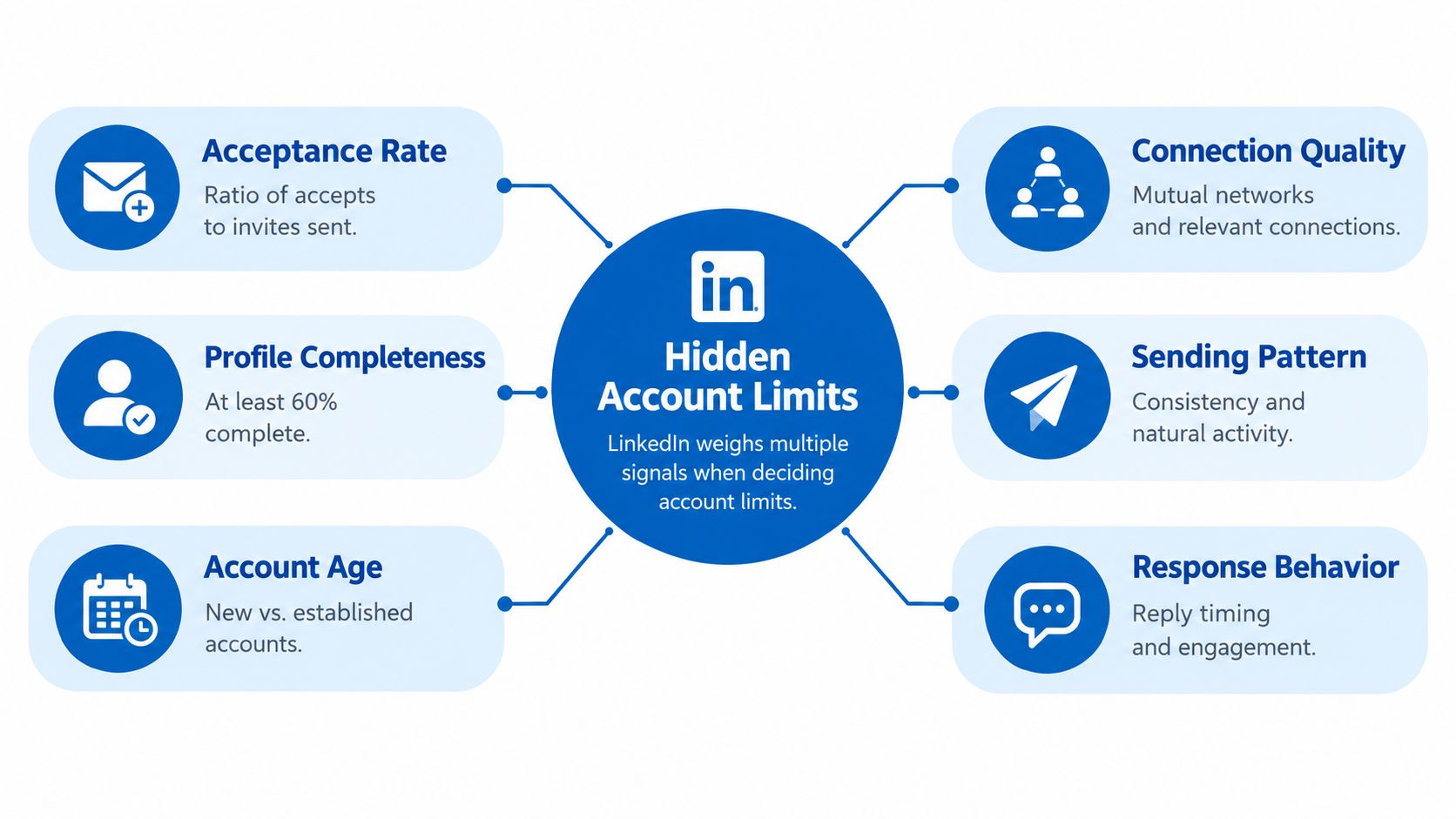
The account-level signals that matter
- Acceptance behavior: Repeatedly sending to people who don’t recognize the sender creates a weaker pattern than connecting through a clear professional context.
- Profile completeness: A credible photo, specific headline, useful About section, and visible activity help recipients understand who is requesting access.
- Account age and warmup: A new or recently revived account has less behavioral history than an established one. Sudden high activity creates a sharper change in pattern.
- Connection quality: Mutual networks, shared communities, relevant posts, and recognizable professional overlap make a request easier to interpret.
- Sending consistency: Evenly paced activity looks more natural than long inactivity followed by a concentrated burst.
- Response behavior: Accepted requests that lead to genuine conversations create a healthier pattern than a stream of disconnected invitations and immediate pitches.
Two SDRs can each send activity near the common weekly range and see different results because these signals differ. One may be contacting warm audiences with a clear reason to connect. The other may be pulling names from a broad list and repeating the same invitation.
The practical response is simple. Don’t increase volume when the account is already showing weak acceptance or a growing pending queue. Improve the audience and pacing first, then test whether the account earns back capacity.
A Safe Scaling Pattern That Holds Up in Practice
Safe scaling starts with restraint. A new account should begin below the level you think it can eventually carry, then earn its way up through normal activity and steady acceptance. On a warmed account, treat the common daily range as a ceiling for planning, not a target to hit by force. On a mature account, weekly volume only holds up when replies, accepts, and general account behavior stay clean.
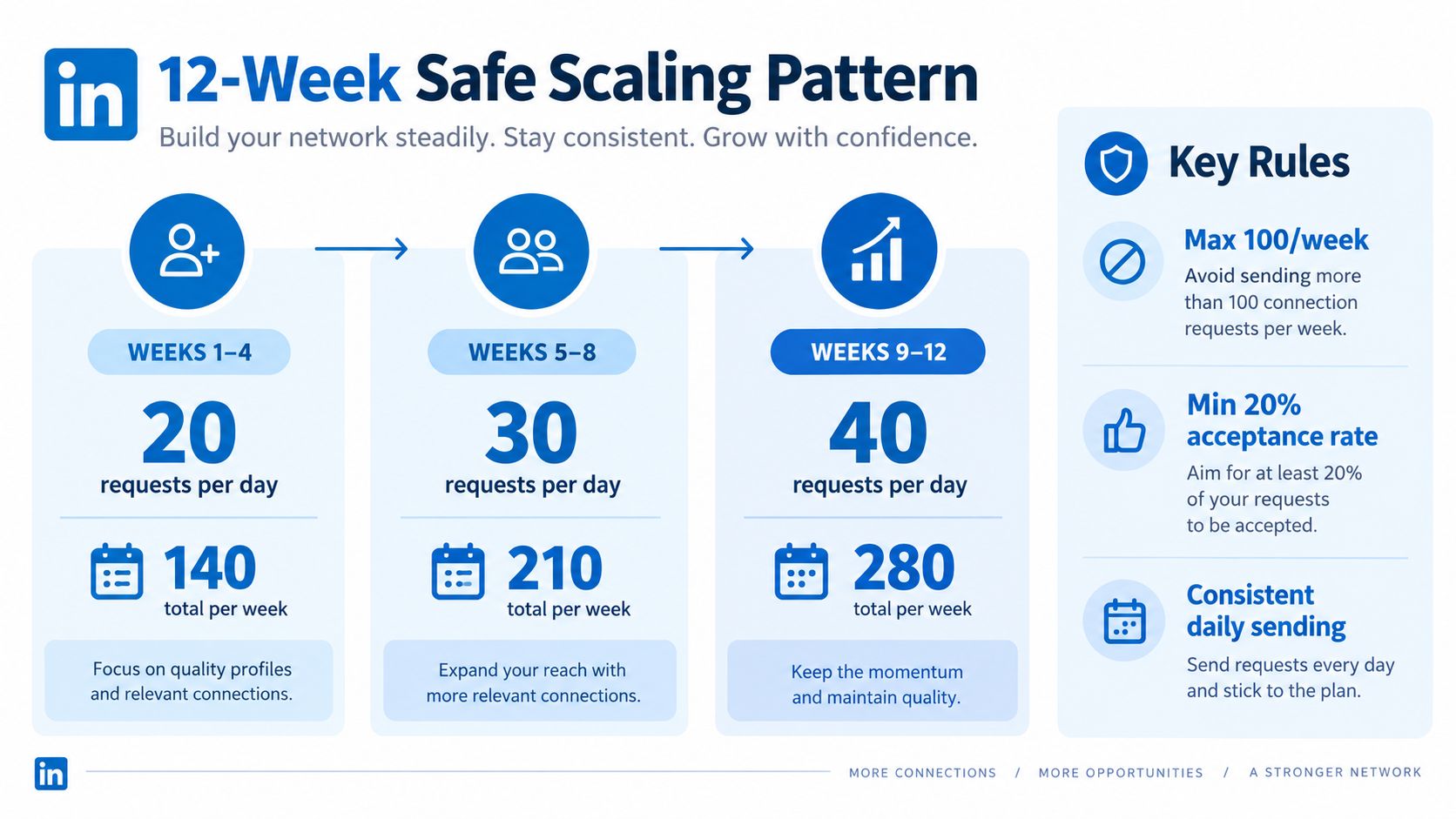
Spread activity instead of batching it
A professional sender does not empty the queue in one sitting. Break requests into normal working windows, leave real gaps between sends, and avoid a large burst after a quiet stretch. Consistency beats cramming every available invitation into a single day.
Use the account like a person doing real research. Read relevant posts, leave specific comments, and review profiles that match the outreach. Those actions should not be camouflage. They should mirror the work a salesperson does before asking for a connection.
A personalized note helps when there is a real reason to connect, such as a shared topic, event, customer segment, or professional interest. If the only note available is a generic compliment followed by a pitch, a clean request is often safer than forced personalization. Free accounts also need to respect the monthly note allowance LinkedIn sets, instead of assuming every invitation should carry a message.
Keep the cadence human
Do not send the same request pattern at the same interval all week. Do not restart at full speed after a weekend, holiday, or restriction. If acceptance weakens, hold volume flat and improve the audience before trying to add more sends. That is the operational rule that keeps an account out of trouble.
For teams building a repeatable process, the founder-led LinkedIn outreach playbook is a useful reference point for relevance-led outreach. If acceptance drops below your trailing four-week average, hold volume flat for one week before adding requests.
A Week in the Life of a Scaling SDR Account
Maya is ramping a new SDR account for a narrow B2B audience. She doesn’t begin by filling every available slot. On Monday, she reviews profiles, updates the account’s positioning, and sends a small, carefully selected batch within the conservative range for a developing account.
Tuesday through Thursday become the steady operating days. Maya sends requests in separated windows rather than one concentrated burst. She uses a personalized note only when a recipient has a clear connection to the topic she’s researching. Otherwise, she sends a focused request without padding it with boilerplate.
The healthy week
Maya watches acceptance behavior as it develops. She doesn’t celebrate a high send count if the recipients aren’t responding positively. She also records which audiences generate accepted connections, which requests remain pending, and which message contexts produce genuine replies.
On Friday, she reduces outbound pressure and spends more time reviewing profiles and contributing relevant comments. That activity helps her understand the audience and gives future recipients a reason to recognize the account. The weekend is a pause, not an excuse to compensate for missed volume with a late-night batch.
Maya’s operating question is not “How much more can I send?” It’s “Which audience is giving this account a reason to keep sending?”
The peak week and cooldown
In a peak week, Maya’s manager asks her to push beyond the account’s established rhythm. Requests go out in larger bursts, the pending queue grows, and acceptance weakens. The first warning may not be a full restriction. It may be a noticeable drop in positive response or an inability to send when the account normally could.
Maya stops adding volume, reviews the targeting, and returns to a slower cadence after the account stabilizes. She also documents the activity so the next campaign doesn’t repeat the same pattern. Teams looking at the broader tool market can use this LinkedIn lead generation tools guide as a comparison point, but no tool removes the need for account-level judgment.
Warning Signs, Restrictions, and How to Recover
Restrictions rarely feel random from inside the account. Early warning signs include declining acceptance, invitations sitting in pending status, an inability to send new requests, and unexpected CAPTCHA or email verification prompts. A sudden change after a burst is especially useful evidence that the account should slow down.
LinkedIn may begin with an invitation restriction rather than disabling the entire profile. More serious account restrictions can affect messaging, profile edits, or other functions. The exact enforcement path depends on the account and the behavior that triggered review, so teams shouldn’t assume that one sender’s recovery timeline applies to another.
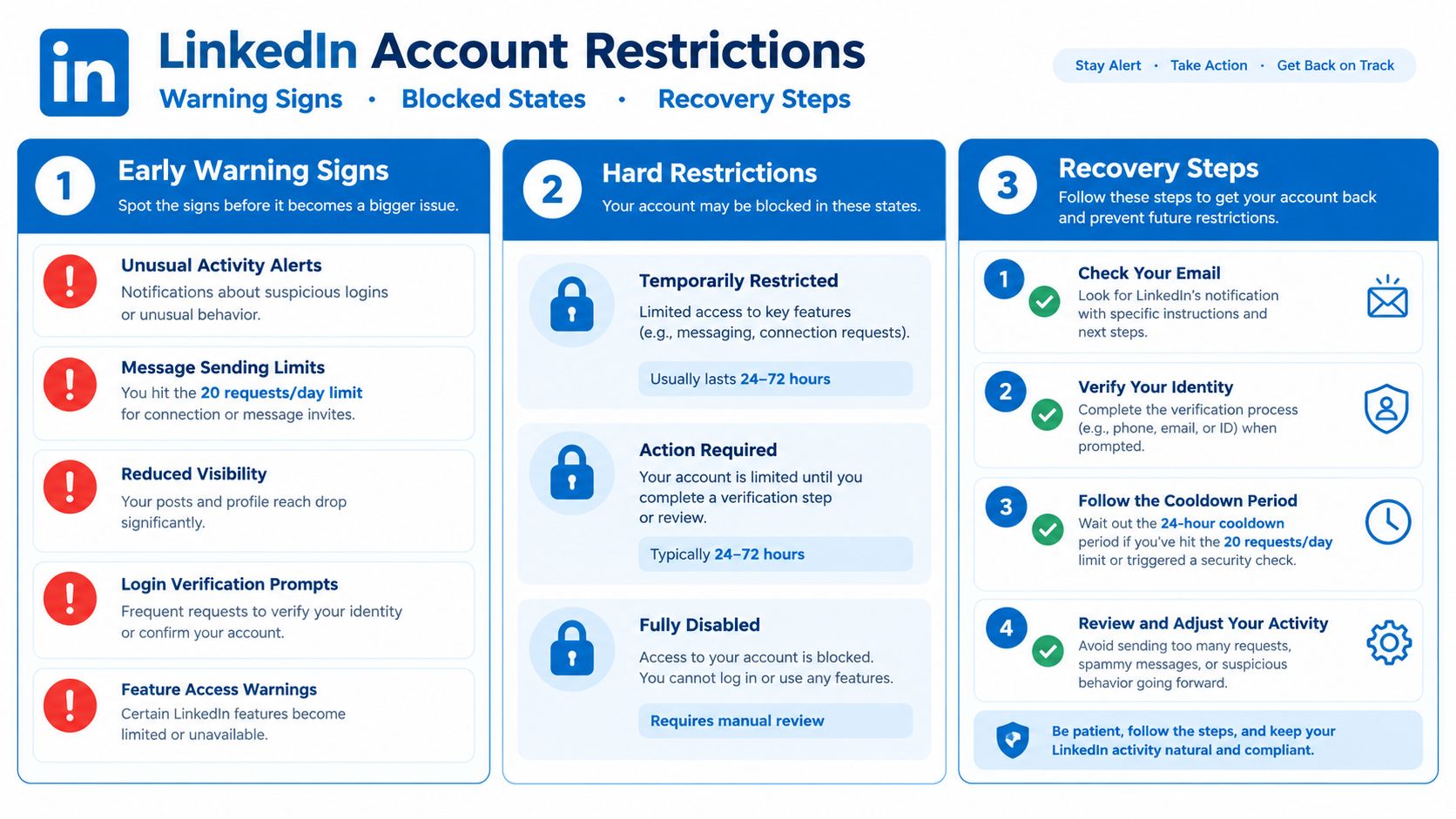
A practical recovery sequence
- Pause outbound activity. Stop connection requests and automated actions rather than repeatedly testing whether the restriction has lifted.
- Audit the audience. Review recent requests for weak relevance, duplicated targeting, and invitations that have remained unanswered.
- Use the normal LinkedIn environment. Reconnect through the official mobile app or browser, complete any requested verification, and avoid abrupt changes in access patterns.
- Resume below the old pace. When access returns, restart cautiously and watch acceptance and pending behavior before adding volume.
Switching immediately to a VPN, creating a second profile, or trying multiple browsers can make the account history harder to interpret. Those actions don’t solve the underlying relevance or pacing problem. Keep one legitimate profile, complete LinkedIn’s verification process if requested, and make the next activity pattern slower and more consistent.
For a separate explanation of common restriction scenarios, EmailScout’s help for LinkedIn restrictions can supplement LinkedIn’s own account guidance. Teams also comparing automation approaches should review what sales automation means with platform compliance in mind. Automation should reduce repetitive work, not imitate aggressive human behavior.
Reframing Limits as a Quality Control System
LinkedIn connection request limits make more sense when treated as a quality control system rather than a quota to defeat. The platform’s documented invitation restrictions, temporary sending blocks, personalized-message rules, and first-degree connection ceiling all point toward a network designed to remain usable and relevant.
That framing changes the metrics a team reports. A high request count can conceal poor targeting, a growing pending queue, and weak commercial results. Accepted connections, meaningful replies, and qualified conversations provide a more useful view of whether the account is operating well.
The operating mindset that scales
- Prioritize relevance over send volume. Start with people who have a defensible reason to recognize the sender.
- Treat throttling as feedback. A restriction may indicate that the audience, timing, or activity pattern needs attention.
- Measure outcomes per accepted connection. This reveals whether the outreach creates useful conversations instead of rewarding empty throughput.
- Give every sender an account-specific cadence. Shared team quotas ignore differences in profile history and audience response.
- Protect trust before expanding activity. A smaller, consistent program is easier to recover than a large campaign stopped by enforcement.
The competitive advantage comes from discipline. Teams that understand the system can keep their outreach relevant, adjust before restrictions become severe, and preserve capacity for prospects who are most likely to engage. Teams that chase the headline number turn every account into a volume experiment.
The goal isn’t to discover the largest number LinkedIn will tolerate. It’s to build a prospecting process whose relevance, pacing, and audience quality make aggressive enforcement less likely in the first place.
LeadBeast helps B2B teams monitor LinkedIn buying signals, qualify people and companies against an ICP, and run context-aware outreach with human-like pacing. If you want to connect request volume to stronger targeting and cleaner campaign data, visit LeadBeast and review how it can fit your outbound workflow.