Most advice about LinkedIn automation treats it as a volume contest: send more invitations, add more follow-ups, and hope the averages work out. That approach can raise account risk while filling inboxes with outreach that has little relevance.
LinkedIn says automated comments, generated by a browser extension, script, or third-party tool without a human click, may be down-ranked or lead to account restrictions. A LinkedIn-published spam report found that 41% of respondents were certain AI was being used to generate spam messages (LinkedIn). More sends do not fix weak targeting. They amplify it.
This guide compares seven tools on safety features, personalization depth, signal-driven triggers, and CRM sync. Some tools execute sequences; others help identify people with a timely reason to hear from you. Before automating invitations, optimise your profile for LinkedIn outreach. Prospects may review your profile before deciding whether to reply.
Table of Contents
- 1. LeadBeast
- 2. HeyReach
- 3. Expandi
- 4. Dripify
- 5. Waalaxy
- 6. La Growth Machine
- 7. SalesRobot
- How the seven LinkedIn automation tools compare on pricing, trials, email support, and best use case
- Matching a LinkedIn Automation Tool to How Your Team Actually Sells
1. LeadBeast
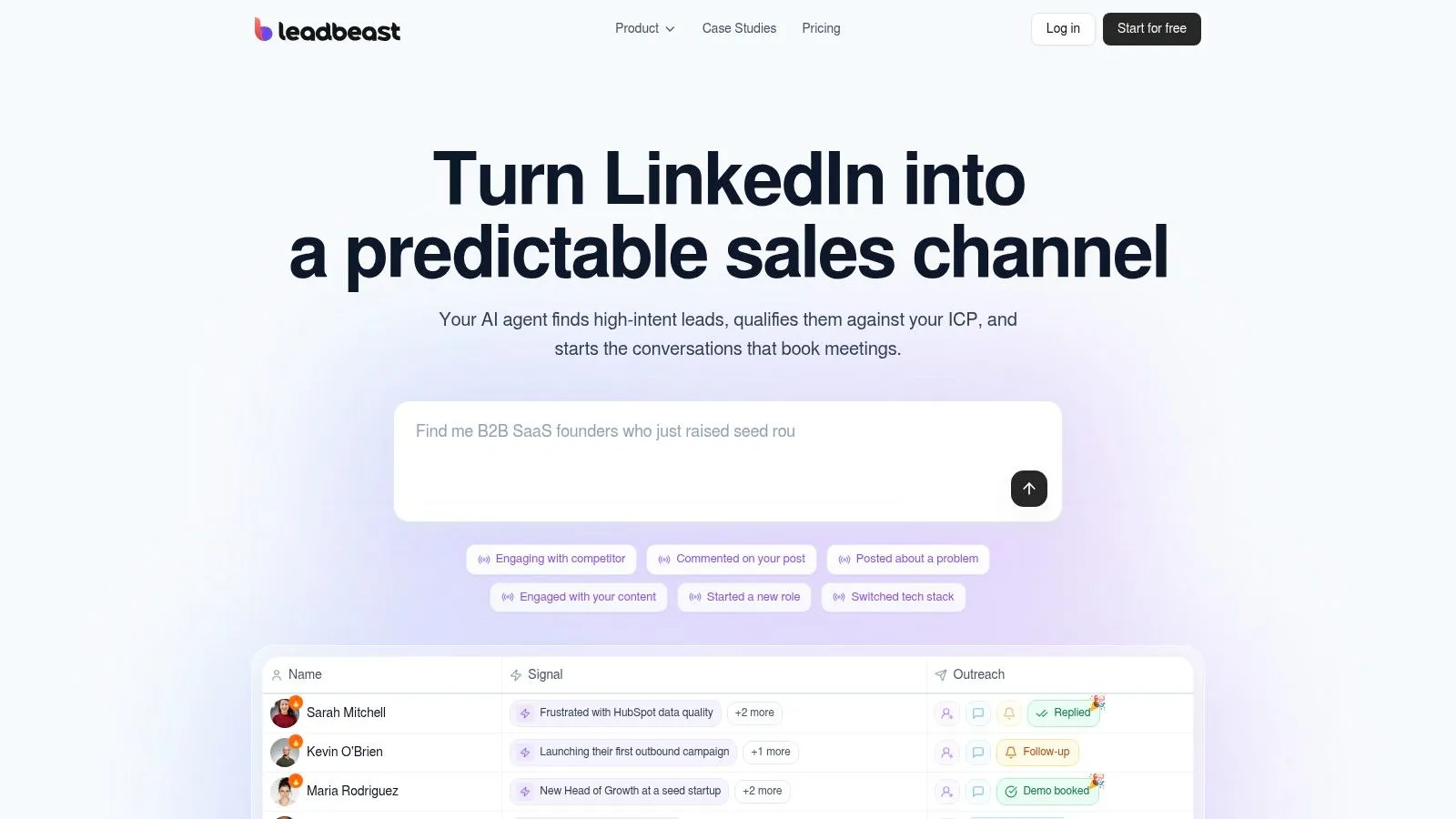
LeadBeast is built to identify buying signals and turn them into relevant outreach. It monitors public LinkedIn activity, including posts, comments, role changes, and competitor engagement, then combines signals into person- or company-level triggers. For teams with a weak prospecting list, that shifts the work from sending more messages to finding a timely reason to contact someone.
You define your ideal customer profile in plain language. LeadBeast scores and enriches matching people and companies, then maintains dynamic audiences as prospects meet the criteria. Messages and follow-ups can reflect the trigger that brought someone into an audience, rather than relying only on a name inserted into a template.
What you actually get
- Signal-based targeting: Combine public interactions and other tracked activity into reasons to engage at the person or company level.
- Connected workflow: Manage campaign replies in a centralized inbox and sync data with CRM and outreach tools. API and MCP access support custom workflows.
- Sender-based pricing: Pricing is structured per LinkedIn sender, with a time-limited free trial. The platform describes feature parity across tiers.
Practical rule: If the tool can’t explain why someone qualifies today, don’t let it send.
LeadBeast suits B2B teams that want to prioritize intent over message volume. Its safety features include human-like pacing, delays, and warm engagement behavior, but automation still carries platform risk. The per-sender pricing also means costs rise as you add LinkedIn accounts, which may make it less suitable for agencies running a large sender fleet.
Choose LeadBeast when your team needs to detect and qualify prospects before starting outreach, then keep replies and campaign data connected to its existing sales tools. Teams that mainly need a straightforward sequence sender may not use its signal tracking and audience qualification.
2. HeyReach
HeyReach is built for the messy middle of outbound: several LinkedIn accounts, one team, and replies arriving in different places. Campaigns, senders, and responses sit in a shared workspace. That matters more for an agency than for a founder sending from a single profile.
Growth plans are aimed at running unlimited campaigns across multiple senders. Agency options add a unified inbox, workspaces, API and webhook access, and white-label features. Eligible plans also support integrations and programmatic workflows, so a revops lead can push activity into the rest of the stack instead of exporting spreadsheets every Friday.
LinkedIn’s own policy doesn’t create a safe daily quota just because you spread activity across accounts. It doesn’t allow third-party software or browser extensions that scrape, modify, or automate activity on its site, and it warns that accounts may be restricted for using them (LinkedIn Help). HeyReach can make multi-account work easier to supervise. It doesn’t turn that work into an approved channel.
Unofficial “safe limits” are operating habits, not permission.
Costs climb with sender count, and some features are clearly aimed at agencies rather than a solo rep. If you only need one sequence on one account, you’re paying for a control room you won’t use. Pair it with a real targeting method, not a scraped dump. A useful starting point is a shortlist of LinkedIn lead generation tools that decide who belongs in the campaign before HeyReach starts sending.
Choose HeyReach when shared inboxes and client workspaces are the actual problem.
3. Expandi
Expandi is a cloud sequencer for teams that have already decided who to contact and now need a campaign that isn’t a straight line. Conditional steps, several campaign types, scheduling, personalization, reporting, and duplicate prevention sit in one builder. You can also put LinkedIn and email steps in the same flow, which is useful when a prospect ignores the first channel and might answer the second.
The vendor lists country-based IPs, warm-up controls, and configurable activity limits. Those are real safety features, and they still don’t rewrite the platform rule. LinkedIn prohibits unauthorized bots, crawlers, browser extensions, scraping, automated connection or message sending, and automated engagement, and it says those tools violate its User Agreement and may lead to restriction or shutdown (LinkedIn Help). Read the LinkedIn connection request limits guidance before you treat a slider as a guarantee.
Where it falls short
- Price: The standard plan is a lot for one solo user who only needs a simple drip.
- Personalization extras: Some richer options may cost more on top of the seat.
- Intent: Expandi executes the list you give it. It doesn’t tell you who just changed roles or commented on a competitor.
Agency users get centralized campaign management and client reporting, which is the cleaner reason to buy it. I wouldn’t buy it to “find demand.” I’d buy it to run a branched LinkedIn-and-email sequence with reporting a manager can open.
4. Dripify
If your motion is already a repeatable sequence, Dripify is the straightforward execution tool. You build LinkedIn and email steps from templates, then watch performance in one dashboard. That is a different product from a signal monitor. Dripify doesn’t specifically watch LinkedIn activity for buying intent, so the quality of the campaign is the quality of the list you import.
Basic is limited to one campaign, which is fine for a test and tight for a team running several offers. Higher plans add unlimited campaigns, a personal inbox, data export, and A/B testing. The Advanced plan adds team management and evergreen campaigns. Pricing is per user, so five reps means five seats. A seven-day trial doesn’t require a credit card, which is the right way to test it: one offer, one segment, one sender.
What works is the discipline. Templates stop every rep from inventing a new sequence on Monday. Email steps give you a second touch without opening another tool. What doesn’t work is expecting the dashboard to rescue a cold, broad list. Reporting, testing, and team controls show you what happened. They don’t decide who deserved the message.
Choose Dripify for founders and small sales teams who want a repeatable outbound workflow and already know their accounts.
5. Waalaxy
Waalaxy is the lower-priced way to see whether outbound is even worth staffing. Prebuilt sequences and automated follow-ups get a new user to a first campaign without designing every branch. Higher tiers add API access, integrations, and LinkedIn-plus-email campaigns. You can sync a CRM and import from LinkedIn, Sales Navigator, and Recruiter Lite, which is enough for a small team that isn’t ready for a heavy engagement platform.
The inbox is a paid add-on, not a standard feature on every plan. Invitation allowances also change by plan, so the cheap entry price isn’t the same thing as a cheap operating plan once you want replies in one place. It doesn’t specialize in person-level buying intent. You’re still sequencing a list.
A sensible first test
- Start narrow: One ICP, one offer, and a short follow-up, not every template in the library.
- Budget the inbox: If replies matter, price the add-on before you compare it with tools that include one.
- Sync early: Turn on CRM synchronization before the first campaign, or you’ll reconstruct the pipeline by hand.
I’d use Waalaxy when a founder wants to learn the motion without a large monthly bill. I wouldn’t use it as the system of record for a multi-client agency.
6. La Growth Machine
La Growth Machine makes sense when LinkedIn is one step in a wider cadence, not the whole program. Sequences can combine LinkedIn and email, with calls or X on higher tiers. On Pro you also get LinkedIn engagement data such as post likers and commenters, a unified LinkedIn-and-email inbox, custom workflows, and A/B testing. That engagement data is the closest this list gets, outside LeadBeast, to reacting to something a prospect did.
Ultimate includes native sync with HubSpot and Pipedrive. Other CRMs can connect through Zapier, which works, but it is another thing to maintain when a field mapping breaks. Other teammates can use the platform without each person being a sending identity. That helps a manager review work without buying a sender seat for every observer.
Per-identity pricing still adds up once several people need to send. Some of the CRM and workflow depth sits on the higher tier, so a basic LinkedIn-only sequence is a poor use of the product. Buy it when coordinating channels is the job. Skip it when you only need invitations and two follow-ups.
7. SalesRobot
SalesRobot combines LinkedIn and email sequences for small B2B teams. Sequences use delays and conditions, and the vendor describes reply detection that pauses outreach when a prospect responds. That helps prevent follow-ups from continuing after a reply, but SalesRobot is primarily an execution tool: it runs campaigns rather than identifying prospects through buying signals.
Plan limits shape the choice. Basic allows one active campaign; higher plans add features such as unlimited campaigns, A/B testing, a personal inbox, and webhook or Zapier integrations. Professional adds team management and activity controls, while Enterprise includes onboarding and dedicated support. Compare monthly costs with the annual plan price before choosing.
Automating LinkedIn activity carries account risk, so use conservative settings and review how campaigns behave before expanding them. The 14-day trial requires no credit card and gives you time to check reply detection, test an email step, and confirm that Zapier sends the fields your CRM needs. For a broader view of what sales automation should cover, define the workflow before launching a sequence.
Choose SalesRobot if your team needs LinkedIn and email execution, clear plan limits, and basic team controls. Look elsewhere if identifying prospects who are showing buying intent is the priority.
How the seven LinkedIn automation tools compare on pricing, trials, email support, and best use case
| Item | Pricing model | Free trial | Email steps | Best for |
|---|---|---|---|---|
| LeadBeast | Per sender; tiered plans | 7 days, no credit card | Not specified | Intent-led LinkedIn prospecting |
| HeyReach | Sender-based; costs rise with more senders | Not specified | Not specified | Agencies managing multiple LinkedIn senders |
| Expandi | Standard plan; pricing details not specified | Not specified | Yes | Configurable LinkedIn and email campaigns |
| Dripify | Per user; tiered plans | 7 days, no credit card | Yes | Repeatable LinkedIn and email sequences |
| Waalaxy | Tiered plans; lower starting price | Not specified | Available on higher tiers | Founders and small teams testing outbound |
| La Growth Machine | Per identity; tiered plans | Not specified | Yes | Coordinated multichannel prospecting |
| SalesRobot | Tiered plans for individuals and teams | 14 days, no credit card | Yes | Small teams combining LinkedIn and email outreach |
Matching a LinkedIn Automation Tool to How Your Team Actually Sells
Pick the tool for the first broken step, not the longest feature list. If you don’t know who is ready to hear from you, start with signal monitoring, plain-language ICP matching, and a CRM sync you trust. If you already have a clean list and several senders, compare inbox design, sender controls, and how replies pause a sequence.
In 2024, 88% of global B2B chief marketing officers agreed that relationship building was key to success in the coming year, according to LinkedIn’s 2024 B2B Marketing Benchmark (LinkedIn). A sequencer can support that only when the first message has a reason to exist. Industry summaries often cite stronger results for social selling, including a claim that 78% of businesses using social selling outperform those that do not, but those figures are directional, not proof that a tool caused the lift (Folk).
Run one small cohort against your current baseline before you add senders.
On the trial, track acceptance, positive replies, meetings, and opt-outs for the same ICP and time window. Add one efficiency check: qualified conversations divided by automated touches. If that number is weak, don’t raise volume. Fix the audience, then confirm your activity limits before anyone talks about scale.
LeadBeast is built for teams that want LinkedIn outreach tied to public buying signals, not another pile of generic invites. It qualifies people and companies against your ICP, drafts trigger-aware messages, and syncs replies with the CRM and outreach tools you already use. If that matches how your team should sell, visit LeadBeast and run the no-card trial on one narrow audience before you scale senders.