A sales rep spots a prospect discussing a problem your product solves, but the signal is buried in a crowded social feed. The contact record sits in one system, the outreach sequence in another, and the CRM still needs someone to log what happened. Adding another tool can help, but only if it takes ownership of a clear job and hands its work to the rest of the stack.
B2B sales software isn’t one interchangeable category. A CRM records relationships and opportunities; prospecting and intelligence tools help teams find and prioritize buyers; engagement platforms coordinate follow-up; conversation analytics help managers understand what happens in calls and deals. CRM software is already foundational for B2B sales operations: research cited by Grand View Research’s CRM statistics roundup says 91% of companies with more than 11 employees use CRM software, while sales-force automation represents the largest CRM use case. That makes the CRM a useful starting point, not a reason to force every sales job into one product.
This guide groups 10 B2B sales tools by the work they perform. It explains where each fits, what teams should test before buying, and the operational trade-offs that can turn a promising demo into a cumbersome deployment. For a broader view of how these systems fit into revenue operations, see Prometheus Agency’s overview of RevOps AI.
Table of Contents
- 1. LeadBeast for LinkedIn intent and outreach
- 2. Salesforce Sales Cloud for complex CRM operations
- 3. HubSpot Sales Hub for a shared sales and marketing workflow
- 4. LinkedIn Sales Navigator for prospect and account discovery
- 5. Outreach for structured engagement at scale
- 6. Salesloft for coordinated revenue execution
- 7. Apollo for prospecting and outbound in one interface
- 8. ZoomInfo SalesOS for data and account intelligence
- 9. 6sense Revenue AI for account-based intent orchestration
- 10. Gong for conversation and deal intelligence
- Top 10 B2B Sales Software Comparison: Features & Pricing
- Build the Stack Around Your Sales Process
1. LeadBeast for LinkedIn intent and outreach
A prospect comments on a post about a problem your product addresses. LeadBeast helps teams use that LinkedIn activity to guide timely outreach, rather than relying only on static lists or broad campaigns. It monitors posts, comments, role changes, and competitor engagement, then uses a team’s plain-language ideal customer profile to qualify and score people and companies.
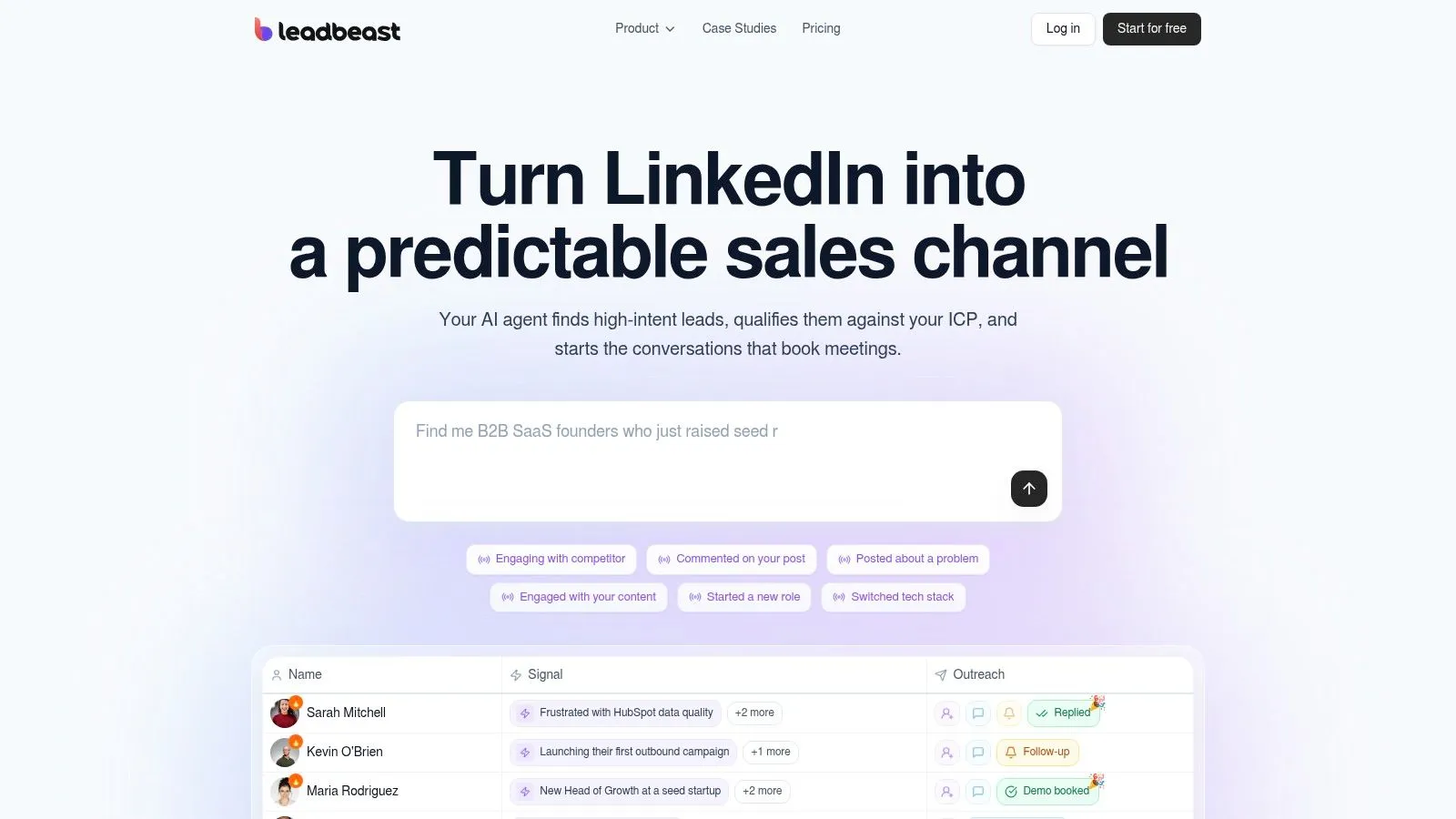
The platform builds audiences that update as prospects match the team’s criteria, and supports LinkedIn messages and follow-ups tied to specific signals. Replies go to a centralized inbox. CRM and outreach integrations, API access, and MCP support can pass activity into other go-to-market systems. That handoff needs testing: if reps must re-enter replies or campaign context, the time saved on prospecting can be lost to manual updates.
Where the trade-off sits
LeadBeast focuses on LinkedIn, so teams that rely on other channels may find it a poor fit. The company also says it has no mobile app. Per-sender billing means costs increase with the number of LinkedIn accounts in use. Listed plans are $99 per month for Essential, $237 per month for Professional, and $483 per month for Business. Each includes a 7-day free trial without a credit card, and subscriptions can be canceled anytime. These are listed prices and terms, not guarantees of results.
LeadBeast reports connection acceptance rates of 30–60% and reply rates of 20–55% on its site. Treat those as vendor-reported figures, not a forecast for your team: results vary with the audience, offer, and message. Test whether alerts match your ICP, whether reps act on them, and whether conversations become qualified opportunities. Keep a human review step so a detected signal prompts investigation rather than an automated assumption that someone is ready to buy.
Practical rule: Treat a LinkedIn signal as a reason to investigate, not proof that a person is ready to buy.
2. Salesforce Sales Cloud for complex CRM operations
Salesforce Sales Cloud is a strong fit when the CRM needs to represent a complex sales process, not just hold contact details. Teams can manage accounts, contacts, leads, and opportunities alongside pipeline dashboards, forecasting, and configurable workflows. Einstein AI features support lead scoring and recommendations, while APIs and the AppExchange ecosystem give administrators routes to connect the CRM with other sales, marketing, service, and analytics systems.
That flexibility comes with operational responsibility. Salesforce can support detailed roles and permissions, but a heavily customized setup requires someone to own the object model, workflows, data rules, and integrations. A team that hasn’t agreed on definitions for lead ownership or opportunity stages may encode its disagreements into a more elaborate CRM.
The right fit depends on administration
Salesforce is most compelling for mid-market and enterprise teams that need a central system spanning multiple functions or supporting custom sales processes. Its CPQ and billing options can also matter when quoting and commercial workflows need to connect to customer and opportunity records. A free trial is available, but a trial doesn’t demonstrate the implementation burden: test the records and handoffs your reps use daily, not only the dashboard shown in a demo.
CRM adoption is common, but data quality remains a material concern. A survey described in Cirrus Insight’s sales productivity statistics found that many CRM users consider a substantial share of their records inaccurate or incomplete. That’s a reminder to define data ownership and validation rules before adding automation. Salesforce gives teams room to build; it won’t decide which records deserve trust.
3. HubSpot Sales Hub for a shared sales and marketing workflow
HubSpot Sales Hub suits teams that want sales activity close to the CRM and, often, to HubSpot’s marketing and service products. Its sales tools include email sequencing, task queues, a dialer, meeting scheduling, quotes, and AI-assisted prospecting and coaching. For a growing SaaS team, the practical appeal is a relatively approachable interface and a shared customer record that can reduce the friction of passing context between functions.
A unified vendor stack can simplify some integrations, but it doesn’t remove the need to check which features and limits apply to each subscription. A free tier is available, yet the free option shouldn’t be treated as equivalent to a fully configured sales deployment. Confirm the paid features, seats, credits, and automation rules you need before estimating the total cost.
Keep the process simple enough to maintain
HubSpot can be a good fit when the team values quick setup and a consistent operating environment more than extensive customization. More complex revenue operations or bespoke data rules may push administrators toward a heavier CRM or additional tooling. The trade-off is not just ease versus power: it’s whether the team can manage the required process without creating fragile workarounds.
Teams comparing CRM approaches should assess how each platform handles account intelligence and shared records, not just the interface. This HubSpot and Salesforce comparison for account intelligence is a useful starting point for that discussion. In a product evaluation, map a real lead-to-opportunity workflow and confirm how sales, marketing, and service teams will use the same customer history.
4. LinkedIn Sales Navigator for prospect and account discovery
Sales Navigator is designed to help sellers find people and companies in LinkedIn’s professional network, track account and buyer activity, and use relationship insights. Advanced search, saved accounts, activity alerts, InMail, list sharing, and job-change notifications can make it easier for an outbound team to research a target account and identify relevant contacts.
The platform is strongest as a discovery and relationship-intelligence layer. It isn’t a replacement for the CRM or a full engagement platform, so teams often pair it with systems that manage sequences, record opportunities, and report on pipeline attribution. CRM synchronization and collaboration features depend on the plan, which makes plan-level verification important if the integration is central to the buying case.
Make discovery useful to the whole team
Sales Navigator fits teams whose buyers are active on LinkedIn and whose reps benefit from account-level research before outreach. InMail access is limited, so it works best when messages are selective and informed by account context rather than sent as a substitute for a thoughtful cadence. Published pricing for Core and Advanced and self-serve purchasing can make initial evaluation straightforward, but check which features your team needs before choosing a tier.
The operational question is what happens after a rep identifies a prospect. Decide where the contact record lives, how activity reaches the CRM, and which platform owns follow-up. Without that handoff, sellers can build useful research in one place while the rest of the revenue team has no visibility into it.
5. Outreach for structured engagement at scale
Outreach is an enterprise-oriented engagement platform for teams that need consistent sales workflows across SDRs and account executives. It supports multichannel sequencing across email, voice, and social, with templates, testing, send-time optimization, and analytics. Its scope also includes account planning, deal inspection, forecasting, and pipeline views, making it broader than a basic sequence builder.
That breadth can help a large team standardize execution and give managers a shared view of activity. It can also make the system feel heavyweight for a smaller group that only needs a straightforward way to manage follow-ups. Expect enablement and process decisions to be part of the rollout, not an optional afterthought.
Check the workflow, not just the sequence builder
Before buying, map how a rep creates a sequence, handles a reply, pauses activity, and updates the CRM. Confirm how ownership and reporting work when a prospect moves between reps or changes status. Pricing is quote-based and plan details vary, so ask which modules and integrations are included rather than assuming every capability in the product suite sits in the proposed package.
Outreach should have a defined role beside the CRM, not become a parallel place to manage deal truth. Teams weighing automation options can also review this guide to sales automation software. The key distinction is the job: sequence execution coordinates planned follow-up, while intent-led prospecting can help a rep decide which relevant event deserves attention in the first place.
6. Salesloft for coordinated revenue execution
Salesloft combines sales engagement with revenue orchestration. Its sequences, dialer, and calendaring support rep activity, while conversation intelligence, prioritization, buyer signals, and analytics can help managers coordinate work across SDRs, AEs, and leadership. That makes it a candidate for organizations seeking shared workflows rather than a tool used only by one outbound team.
For managers, a common system can make coaching and activity review more consistent. But the broader feature set may exceed what smaller teams need, and public pricing isn’t listed. Packaging can also be difficult to compare without a clear view of which capabilities are included in the proposed plan.
Name who owns each sales action
Salesloft is worth evaluating when multiple sales roles need coordinated guidance and managers want connected views of outreach and pipeline activity. During a demo, follow a real opportunity from prioritization to outreach and then to manager review. Ask which system owns the prospect record, where conversation data is stored, and how activity synchronizes with the CRM.
Don’t pay for overlapping modules without a specific reason. Teams comparing engagement platforms should distinguish sequencing, coaching, and next-action guidance before they decide which tools belong in the stack. This overview of sales engagement platforms can help frame that decision around the work reps and managers need to do.
7. Apollo for prospecting and outbound in one interface
Apollo combines B2B contact and company data with sales engagement features such as sequencing and dialing. It also supports enrichment, a Chrome extension for LinkedIn and CRM workflows, AI assistants, rules-based automation, and API access. That combination can be attractive to startups, SMBs, and agencies that want to get an outbound motion running without connecting a separate data provider and sequencer immediately.
A consolidated interface can reduce setup work, but it doesn’t guarantee that every contact field is accurate for every segment. Test coverage against the roles, industries, and regions your team targets. Credit-based enrichment also requires active management: a plan that looks generous during light testing may behave differently once reps enrich records at scale.
Treat credits and data quality as operating costs
Apollo offers self-serve access and a free plan, which can make it easier to test the workflow before a larger commitment. Teams should still check credit use, data freshness, and how records move into the CRM. When a rep finds a bad number or outdated role, make sure the process for correcting it is clear and that the update reaches the systems other reps rely on.
Apollo can work well as an early outbound stack, while larger teams may prefer separate best-fit tools for data, engagement, and CRM governance. If your team would rather delegate prospecting or execution, this resource on finding outsourced sales help can help frame the in-house versus outsourced decision.
8. ZoomInfo SalesOS for data and account intelligence
ZoomInfo SalesOS serves teams that need contact and company intelligence for outbound or account-based marketing. Its capabilities include contact discovery, company information, enrichment, intent signals, org charts, and technographics. Engage and MarketingOS modules extend the product family into broader go-to-market workflows, while integrations can feed information to CRM and engagement systems.
The product’s breadth can support a coordinated account strategy, but enterprise buyers should confirm exactly what the proposed package includes. Pricing is custom, and data coverage can vary by region and industry. Before signing, test representative records from your target market and verify seats, usage rights, exports, integrations, and any intent topics that matter to your team.
Use intent as a prioritization input
Company-level research interest can help teams decide which accounts to investigate first, but it doesn’t prove that a particular person is ready to buy. Reps still need a relevant contact, a sound reason to reach out, and an appropriate message. Treat the data layer as an input to the revenue workflow, not a substitute for qualification.
Teams comparing providers can use this overview of sales intelligence tools to clarify whether the gap is contact discovery, enrichment, account intent, or a handoff between systems. For ZoomInfo, the buying decision should rest on demonstrated fit with your target segment and the operational cost of maintaining the data, not on the number of available modules.
9. 6sense Revenue AI for account-based intent orchestration
6sense is designed for account-based organizations that want to identify in-market accounts and coordinate marketing and sales activity around them. Its platform supports predictive account scoring, buying-stage models, keyword signals, seller alerts, advertising, and site personalization. CRM-embedded insights can put account context closer to the salesperson’s daily workflow.
The strongest fit is a team that can act on account-level prioritization across functions. If marketing runs advertising, SDRs follow up, and AEs manage named accounts, 6sense can provide a shared layer for those plays. A team with no agreement on account ownership or follow-up rules may instead create more alerts without improving the sales motion.
Plan for implementation, not just the model
6sense is enterprise-oriented, with a custom sales process and onboarding rather than public pricing. Buyers should ask how the scoring model is configured, what signals are included, how alerts enter the CRM, and how the team will decide which ones warrant action. The test should include a real account cohort and a clear definition of what counts as a qualified opportunity.
Intent scores are useful only when sales and marketing agree on what they mean. Establish how sellers can inspect the basis for an alert, how duplicate signals are handled, and how the organization will compare signal-led activity with existing targeting. That governance makes the platform more actionable than a dashboard full of unexplained scores.
10. Gong for conversation and deal intelligence
A manager reviewing a stalled deal can use Gong to find what buyers raised on calls, where follow-up slipped, and whether the CRM reflects the conversation. Gong records and analyzes calls, meetings, and emails, giving sales teams tools for coaching, deal reviews, and forecasting. Its Revenue Intelligence connects customer interactions with pipeline views, while Gong Engage adds outreach capabilities. Used with a CRM, it can help teams capture interactions, review patterns, and apply those findings in later conversations.
The operating routine matters as much as the call library. Managers need agreed criteria for which conversations to review and a way to give feedback without making reps feel surveilled. Set rules for recording permissions, access, retention, and how interaction details update CRM records.
Price the operating model
Gong uses quote-based pricing, generally combining a platform fee with per-user licenses. CRM and communications integrations connect it to existing workflows, but deployment and governance still require an internal owner. Ask how costs change with team size and which analytics, engagement, and forecasting features are included.
Practical rule: Buy conversation analytics when managers have a clear coaching and deal-review routine, not just because recorded calls sound valuable.
Top 10 B2B Sales Software Comparison: Features & Pricing
| Platform | Core strengths | Best for | Standout value | Pricing |
|---|---|---|---|---|
| 🏆 LeadBeast | ★ Real-time LinkedIn intent signals, ICP scoring, dynamic audiences, personalized outreach | 👥 B2B teams prospecting on LinkedIn | ✨ Signal stacking and trigger-specific messaging; 30+ integrations, API, and MCP | 💰 $99–$483/month per sender; 7-day free trial |
| Salesforce Sales Cloud | CRM, pipeline management, forecasting, Einstein AI | 👥 Mid-market and enterprise sales teams | ✨ Highly customizable platform and broad AppExchange ecosystem | 💰 Pricing varies by plan; 30-day free trial |
| HubSpot Sales Hub | Sequences, dialer, quotes, AI prospecting | 👥 SaaS teams seeking quick setup | ✨ User-friendly experience and close alignment with HubSpot hubs | 💰 Free tier; paid plans vary |
| LinkedIn Sales Navigator | Advanced prospect search, buyer alerts, InMail | 👥 Teams selling to LinkedIn-active buyers | ✨ Direct access to LinkedIn’s professional network | 💰 Per-license pricing; varies by plan |
| Outreach | Multichannel sequences, deal views, forecasting, analytics | 👥 Large teams standardizing sales execution | ✨ Robust workflow controls and reporting | 💰 Quote-based |
| Salesloft | Sequences, dialer, revenue intelligence, prioritization | 👥 Organizations coordinating sales roles | ✨ Coaching and analytics across SDR and AE workflows | 💰 Quote-based |
| Apollo | B2B contact data, sequencing, dialer, enrichment | 👥 Startups, SMBs, and agencies | ✨ Prospecting data and outreach in one platform | 💰 Free plan; paid plans and credits vary |
| ZoomInfo SalesOS | Contact and company data, intent, org charts | 👥 Enterprise outbound and ABM teams | ✨ Broad intelligence suite and GTM integrations | 💰 Custom pricing; annual contracts common |
| 6sense Revenue AI | Account scoring, buying stages, seller alerts, advertising | 👥 ABM-led sales and marketing teams | ✨ Predictive intent across coordinated campaigns | 💰 Custom quote and onboarding |
| Gong | Call analysis, coaching, deal insights, forecasting | 👥 Teams focused on conversation quality and revenue intelligence | ✨ Turns customer interactions into coaching and deal signals | 💰 Quote-based; platform and user fees may apply |
Build the Stack Around Your Sales Process
A rep receives a buying signal, finds the right contact, sends follow-up, and logs the conversation. If any handoff breaks, adding another tool may create more work instead of improving the process. Start by identifying where that workflow stalls.
For prospect discovery, LinkedIn Sales Navigator helps reps find buyers and track account activity; Apollo combines contact data with outbound tools, while ZoomInfo adds company and account intelligence. 6sense fits teams coordinating account-based programs around intent signals. LeadBeast focuses on LinkedIn activity, prospect qualification, and trigger-aware outreach. These tools serve different discovery and intelligence needs, so choose based on the signals and records your team can maintain.
When follow-up is the bottleneck, Outreach and Salesloft support structured engagement across sales roles. Salesforce can support complex CRM operations, while HubSpot suits teams seeking a shared sales and marketing workflow. Gong addresses a different problem: analyzing customer conversations and using those insights for coaching and deal review.
Connect the systems around clear ownership. Discovery and intent tools should pass useful account and contact context to the CRM. Engagement platforms should log activity and adjust follow-up when a prospect responds. Conversation analytics should attach insights to the deal record and inform a defined coaching routine. Decide which platform owns each record, what data syncs, and who resolves duplicates or conflicting updates.
Test a representative workflow with your team and target accounts before buying. Check how the tool explains signals, matches records, handles replies, and updates the CRM. Include seats, data usage, integrations, training, administration, and governance in the cost estimate. Automation only helps when reps can verify its output and fit it into their daily process.
Measure results beyond activity volume. Track whether reps act on alerts, whether outreach leads to relevant conversations, and whether those conversations become qualified opportunities. Quota attainment remains difficult for many sales teams, as findings from Ebsta and Pavilion summarized by Everstage indicate. Adoption and message counts are not proof of better selling. Choose software your team can operate reliably and connect to revenue actions.
LeadBeast monitors public LinkedIn activity, qualifies prospects against your ICP, and helps your team start context-aware conversations with less manual list work. If LinkedIn intent is a gap in your revenue stack, visit LeadBeast to explore its workflow and try it free.