Most lists of LinkedIn lead generation tools assume one automation platform can handle everything, from finding the right account to booking a meeting and updating the CRM. That assumption creates expensive gaps. A tool may find contacts but fail to recognize buying intent, send messages but leave replies scattered, or automate activity without giving your team a clean handoff.
The better approach is to choose tools by the job they perform in your revenue system. This comparison separates intent detection, first-party prospecting, LinkedIn sequencing, multichannel orchestration, CRM synchronization, and off-platform contact enrichment. It also considers implementation effort, data quality, ownership of replies, and the platform risk that comes with non-native automation.
Safety matters because more automation isn’t automatically better. Current comparisons increasingly emphasize smart limits, human-like pacing, and account-safety controls, while the category is also moving toward safety-first infrastructure and multi-account management, as discussed in this analysis of LinkedIn lead-generation tools. The right stack gives your team enough power to act on relevant signals without turning every profile into a target for indiscriminate messaging.
Table of Contents
- 1. LeadBeast
- 2. LinkedIn Sales Navigator
- 3. Apollo.io
- 4. Expandi
- 5. Waalaxy
- 6. La Growth Machine
- 7. Dripify
- 8. Surfe
- 9. Reply.io
- 10. Lusha
- Top 10 LinkedIn Lead-Gen Tools, Feature Comparison
- Build the Smallest Stack That Fits Your Motion
1. LeadBeast
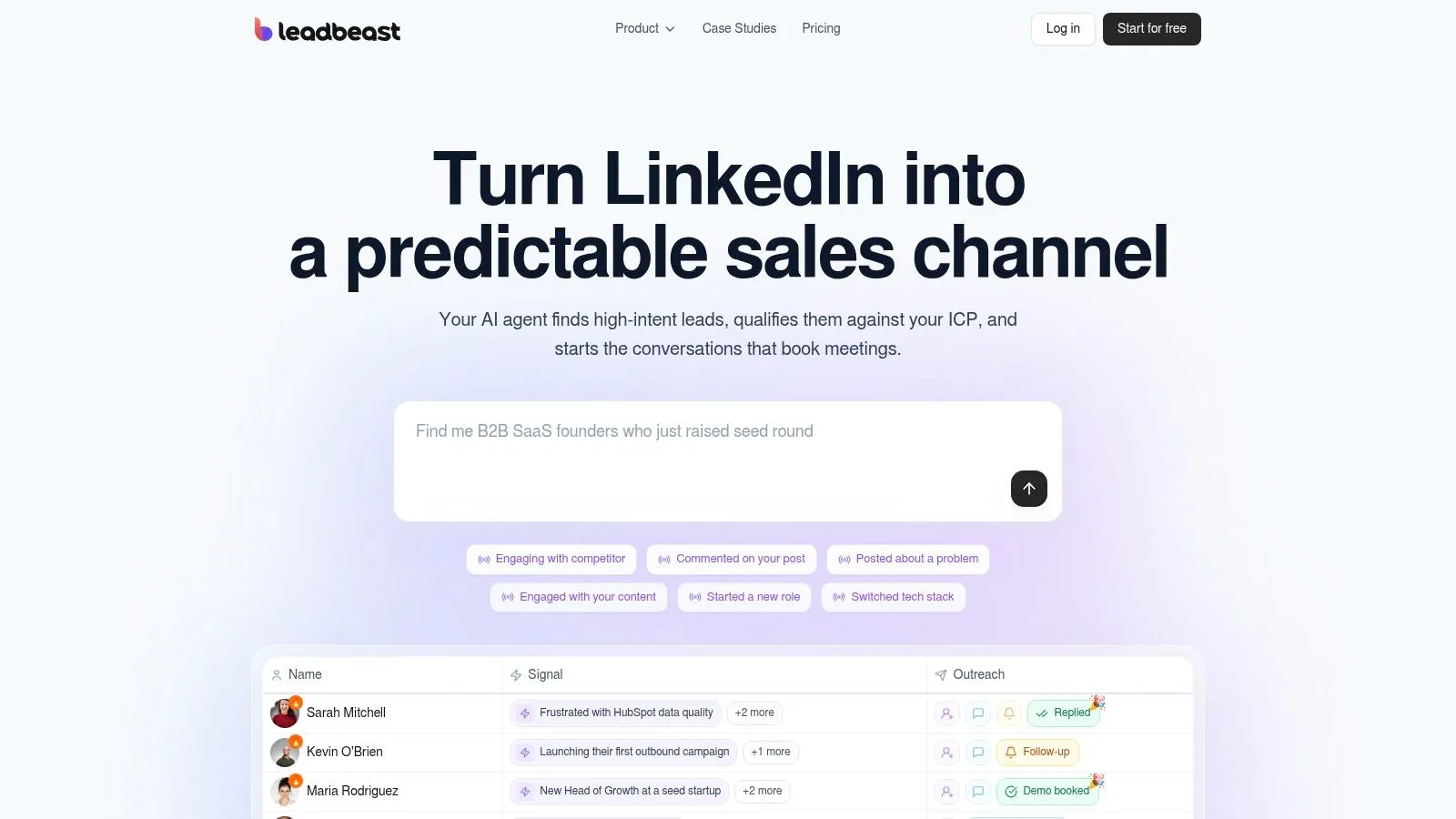
LeadBeast addresses the hardest part of many LinkedIn programs: deciding which activity deserves a response. It monitors public signals such as posts, comments, role changes, and competitor engagement, then combines related actions through signal stacking. A single like rarely says much. A pattern across several signals can provide a stronger reason to research and contact the person.
Teams describe their ideal customer profile in plain language through Smart Audiences. The platform builds and refreshes audiences using role, buying stage, company behavior, and firmographics, reducing the need to maintain CSV lists by hand. That workflow fits B2B SaaS founders, growth leaders, SDR teams, and agencies that judge prospecting by conversation quality rather than activity volume.
Where LeadBeast fits
LeadBeast sits primarily in the intent-detection layer, then carries that context into outreach. Messages and follow-ups can reflect the event that triggered the prospect instead of starting with a generic template. Replies arrive in one inbox, while lead scoring and enrichment connect qualification to the ICP and buying stage.
The broader workflow includes bidirectional integrations with common CRM and outreach systems, along with API and MCP access. That gives revenue teams a path for sending campaign data, replies, and lead status into existing GTM processes. The practical benefit is a cleaner handoff after intent is identified, although teams still need clear ownership for reviewing signals and replying.
Trigger context also affects results. LinkedIn benchmark data shows connection acceptance averaging 28–30% and post-connection message replies averaging 10.4%. Results vary by segment, with staffing and recruiting at 18.9% reply rates versus 8.8% in computer software. LinkedIn benchmark data published by LinkedNav should be treated as directional, not as a forecast for a specific campaign.
Practical rule: Use LeadBeast when the bottleneck is choosing whom to contact and what to say, rather than increasing connection volume.
Its trade-off is workflow concentration. LinkedIn remains the center of execution, so teams that need email-first orchestration or broad contact discovery may need additional tools. LeadBeast’s human-like pacing, send limits, delays, and warm engagement behavior address platform-risk concerns, but they do not remove the need for account governance. Per-sender pricing can also matter for agencies and teams operating multiple LinkedIn accounts. Evaluate the current plan structure and trial terms on the LeadBeast website before expanding deployment.
2. LinkedIn Sales Navigator
LinkedIn Sales Navigator is the strongest choice when the team wants first-party prospecting data and a native workflow. Its advanced lead and account search helps reps filter by professional and company attributes, then save leads or accounts for ongoing monitoring. Alerts for job changes, posted content, and company news give sellers useful reasons to return to a prospect instead of treating the profile as a static record.
The platform also supports relationship-oriented selling through saved searches, lead recommendations, relationship insights, Smart Links, and InMail. Advanced and enterprise-oriented tiers provide deeper integration options and success support, including CRM synchronization on higher-level plans. For teams that need a defensible source of LinkedIn activity and want to keep prospecting close to the native platform, Sales Navigator is the safest foundation.
Its limitation is equally important. Sales Navigator is designed for research, prioritization, and direct selling, not bulk automated sequencing. Reps still need a clear operating process for turning alerts into research, personalized outreach, and CRM updates. Adding an external sequencer can increase execution capacity, but it also introduces a separate platform-risk decision and more process governance.
Small teams should use saved account lists, job-change alerts, and posted-content alerts as a daily prioritization layer. Enterprise teams should evaluate the CRM and administration features before assuming a lower-tier subscription will support the required workflow.
For a practical operating model, pair the platform with a structured founder-led LinkedIn outreach playbook. Sales Navigator finds and monitors the right people. Your messaging process determines whether those signals become useful conversations.
3. Apollo.io
Apollo.io combines contact discovery, enrichment, and sales engagement in a single operating environment. Its Chrome extension overlays LinkedIn and Sales Navigator, allowing reps to capture prospects without repeatedly switching between tabs. Those contacts can move into Apollo sequences that include email, calls, and LinkedIn task steps, which makes Apollo a practical all-in-one option for SMB and mid-market teams.
The strength is workflow continuity. A rep can research a profile, enrich the record, place it into a cadence, and connect the activity to the CRM without stitching together several narrow tools. Apollo also includes intent topics and filters, credits-based enrichment, API access, and a broad integration ecosystem.
The execution trade-off
Apollo’s LinkedIn steps aren’t always fully autonomous. Some tasks require the rep to execute the action through the extension and mark it complete, so the platform works best when the team wants structured human participation rather than a completely hands-off LinkedIn robot. That can be an advantage for account safety and message quality, but it also creates operational dependency on rep discipline.
The credits and usage model requires attention during implementation. Teams should define which records deserve enrichment, when email or phone data is necessary, and which fields belong in the CRM. Otherwise, users can consume credits on prospects who never reach a qualified conversation.
Apollo is a good fit when email, dialing, and LinkedIn belong in one cadence. It isn’t the best standalone answer if the central problem is detecting nuanced LinkedIn activity before a prospect enters a sequence. For that decision, teams should understand the difference between intent signals and static lists.
4. Expandi
Expandi is a cloud-based LinkedIn outreach platform for teams that want LinkedIn-first campaign execution with centralized inboxing. Its campaign builder supports connection flows, follow-up messages, templates, blacklists, webhooks, and downstream integrations. Agencies and SDR teams can use it to manage several outreach motions without keeping a browser window open for every campaign.
The platform’s main appeal is control over activity patterns. Throttling, randomization, working logic, and blacklists give operators tools for managing volume more deliberately than a basic browser extension. Expandi also keeps campaign conversations in a smart inbox, which is useful when multiple campaigns generate replies that need ownership and qualification.
LinkedIn automation should be treated as a governed sales process, not a volume switch.
Expandi is still non-first-party automation. Cloud delivery and safety features may make operations easier to manage, but they don’t remove the platform risk associated with automated LinkedIn activity. Teams should set conservative limits, exclude existing relationships and sensitive accounts, and stop sequences as soon as a prospect replies or changes status.
The main product trade-off is channel depth. Expandi is strong for LinkedIn-first execution, but teams that need coordinated email outreach generally need a companion system. That pairing can work well, provided the CRM remains the source of truth for consent, ownership, status, and suppression.
Agencies evaluating the platform should also examine how campaign governance works across clients. A useful operational reference is the Northbound Studio outreach case study, but any published result should be treated as directional rather than as a promise for a different ICP or offer.
5. Waalaxy
Waalaxy targets small teams and agencies that want LinkedIn and email automation in one approachable workspace. Its sequence builder makes it relatively easy to combine connection requests, LinkedIn follow-ups, and email steps, while the inbox, team collaboration features, templates, and analytics reduce the need for several separate tools.
The strongest use case is a straightforward multichannel motion. A small outbound team can launch a campaign quickly, keep basic coordination in one dashboard, and add email when a LinkedIn conversation doesn’t develop. That simplicity matters for teams without a dedicated sales-operations owner.
Waalaxy isn’t as compelling when the team needs deep personalization logic or advanced intent detection. Template variables and personalization depth can be limited on some plans, so operators need to supply the relevance through segmentation, trigger research, and copy review. A generic message sent through a polished sequence is still generic.
Where small teams need discipline
The product’s browser and session-based automation model creates a platform-risk consideration. Users shouldn’t interpret easy setup as permission to maximize activity. Account history, message quality, pacing, and the proportion of manual actions still matter.
Waalaxy works best when the campaign has a narrow audience, a clear offer, and a small number of meaningful steps. It works less well when a team imports broad lists and expects automation to create relevance after the fact. Use it as an execution layer, not as a substitute for deciding why each prospect should hear from you.
6. La Growth Machine
La Growth Machine is designed for teams that need multichannel orchestration beyond LinkedIn. It supports sequences across LinkedIn, email, X, and calls, with social warming and persona-based cadence options. This makes it useful when LinkedIn starts the relationship but email or phone carries the detailed business conversation.
The platform also includes enrichment and CRM synchronization, with pay-per-use credits for data operations. Its pre-engagement patterns can help teams create a more deliberate path from awareness to outreach, especially when the motion depends on engaging with a prospect before asking for time.
That breadth adds implementation work. Teams must define channel order, ownership, fallback logic, stop conditions, and the rules for moving a prospect from social activity into direct outreach. Enrichment credits also introduce variable cost, so the team should decide whether every lead receives enrichment or only contacts that meet a qualification threshold.
Best fit for cross-channel revenue teams
LGM is a better match for a revenue team with an established outbound process than for a founder who wants to test a simple LinkedIn message. It can coordinate complex plays, but complexity can hide weak targeting. A sequence with four channels won’t rescue an offer that lacks a clear reason for contact.
The platform’s documentation and GTM resources can support implementation, while HubSpot users may value its deeper synchronization options. Review any minimum commitments or plan conditions for your market before building the entire motion around it.
7. Dripify
Dripify focuses on approachable LinkedIn automation with email steps available inside the same sequence. Its interface is designed for fast setup, and the platform includes working hours, randomized timing, adaptive throttling, team management, analytics, and email-finder credits.
It fits teams that want a LinkedIn-first process with an email fallback but don’t need the broader orchestration of a platform such as La Growth Machine or Reply.io. A sales manager can define a sequence, assign seats, review activity, and monitor campaign outcomes without assembling a large technical stack.
The safety controls are useful, but they don’t turn automated outreach into a risk-free activity. Dripify remains third-party automation, so teams should use sensible limits and create explicit rules for pausing campaigns when prospects reply, change jobs, or become customers.
What it does well
Dripify’s strongest advantage is usability. Reps can learn the workflow quickly, and the combination of LinkedIn and email avoids forcing every team to buy a second sequencing tool. The built-in email-finder credits may also reduce tool switching during prospect research.
Its limitation appears at larger scale. Teams that need complex branching, advanced CRM governance, or extensive channel coordination may outgrow the native workflow and add external systems. That can create duplicate records and unclear ownership unless the CRM receives every material status change.
Choose Dripify when implementation speed matters and the motion is relatively simple. Don’t choose it solely because a sequence can run automatically. The audience definition and message review still determine whether the activity is useful.
8. Surfe
Surfe, formerly Leadjet, solves a different problem from most LinkedIn automation platforms. It places a CRM workflow inside LinkedIn through a Chrome extension and web app, allowing reps to add prospects to the CRM, update records, and synchronize information without copying profile data into spreadsheets.
Its enrichment layer uses a waterfall approach across multiple sources to find verified emails and mobile numbers. Account lookalikes and list-building features support prospect research, while integrations with Salesforce, HubSpot, Salesloft, and other sales systems help connect LinkedIn research to downstream execution.
Surfe is especially valuable for account executives and SDRs who already spend their day in LinkedIn but lose time during CRM handoff. The bi-directional sync means the workflow isn’t limited to pushing a contact into the CRM once. Teams can also keep prospect status and relationship data aligned across systems.
Implementation note: Decide which system owns lead status before enabling bi-directional synchronization.
Surfe isn’t a bulk outreach sequencer. Teams will pair it with Sales Navigator, an engagement platform, or a CRM cadence tool. That separation is a strength when your existing engagement process is mature, but it means Surfe won’t independently solve targeting, message creation, or reply management.
Credit planning matters for high-volume enrichment. Set rules for when to enrich, which fields are mandatory, and how duplicates are handled before giving the extension to the whole sales team. Used that way, Surfe is a strong CRM handoff and enrichment layer, not an all-in-one LinkedIn acquisition engine.
9. Reply.io
Reply.io is a mature sales engagement platform for teams that need email, LinkedIn, SMS, and calling inside a coordinated cadence. Its Chrome extension lets reps execute LinkedIn actions from LinkedIn, Sales Navigator, Recruiter, or supported CRM workflows, while the broader platform manages sequence logic, AI assistance, dialing, and integrations.
The product fits organizations that already think in multichannel cadences. A manager can standardize how a prospect moves from email to LinkedIn to phone, assign task ownership, and inspect performance within one engagement system. That is more useful than a standalone LinkedIn tool when the sales motion depends on several channels.
The extension also defines the key trade-off. Reps still need to perform LinkedIn steps in a human-safe way, and the team needs process discipline around timing, personalization, and stopping conditions. Automation can present a task at the right moment, but it shouldn’t remove judgment from a sensitive social channel.
Governance matters more than sequence length
Reply.io’s pricing depends on active contacts and plan type, so teams should model how their audience changes over time before committing. The operational cost may also include training, CRM field mapping, and review of LinkedIn execution standards.
Choose Reply.io when you need a central engagement system with LinkedIn as one channel among several. If the primary bottleneck is recognizing a buying signal from a post, comment, role change, or competitor interaction, you’ll likely need a separate intent layer before Reply.io.
10. Lusha
Lusha is an off-platform contact discovery and enrichment tool. Its Chrome extension surfaces email addresses and phone numbers from LinkedIn profiles and company websites, helping reps move from a social profile to a broader contact strategy.
That makes Lusha useful after a rep has already identified the right person. The platform supports prospecting lists, a credits model, CRM integrations, team controls, and usage reporting. The extension is simple enough for SDRs to adopt during live research rather than forcing them into a separate database workflow.
Lusha isn’t a LinkedIn sequencing platform. It won’t decide which public interaction signals indicate intent, manage a LinkedIn inbox, or coordinate a multichannel cadence by itself. Teams typically pair it with Sales Navigator for first-party prospecting and an engagement platform for execution.
Data quality and cost control
Coverage can vary by region and role, so teams should test the records that matter to their market before scaling usage. Credits also create a variable-cost decision. Enriching every profile is rarely the best use of budget when many prospects won’t meet the ICP or respond to the offer.
Use Lusha when missing contact data is blocking follow-up outside LinkedIn. If your team already has reliable email and phone coverage, invest first in better segmentation, intent detection, and CRM hygiene. Contact completeness helps only when the sales process knows what to do with the completed record.
Top 10 LinkedIn Lead-Gen Tools, Feature Comparison
| Product | Core features ✨ | UX & quality ★ | Pricing/value 💰 | Target audience 👥 |
|---|---|---|---|---|
| 🏆 LeadBeast | ✨ Real‑time LinkedIn signals, signal‑stacking, Smart Audiences, AI moment‑matched outreach, inbox & CRM/API sync | ★★★★★ 30–60% connect · 20–55% reply · centralized inbox | 💰 From $99/mo per sender · 7‑day trial · tiered plans (Essential → Business) | 👥 B2B SaaS founders, VPs Sales, SDR/BDR, agencies, startups |
| LinkedIn Sales Navigator | ✨ First‑party alerts, advanced lead/account search, InMail, saved lists | ★★★★☆ Native data · very safe · consistent UI | 💰 Paid tiers; enterprise sync on higher plans · can be pricey at scale | 👥 Enterprise sellers, AEs, in‑platform prospectors |
| Apollo.io | ✨ Data + engagement, Chrome extension, sequences (email/LinkedIn/calls), enrichment | ★★★★☆ Strong all‑in‑one for SMB · good UI | 💰 Freemium + paid tiers · enrichment credits model | 👥 SMB/mid‑market SDRs, sales ops |
| Expandi | ✨ Cloud runner, human‑like pacing, campaign builder, smart inbox, webhooks | ★★★★☆ Good safety tooling for volume · LinkedIn‑first | 💰 Single plan with agency features · transparent pricing | 👥 Agencies, SDR teams running LinkedIn sequences |
| Waalaxy | ✨ LinkedIn + email multichannel, templates, team collaboration, auto‑warm | ★★★☆☆ Very easy to learn · budget friendly | 💰 Low entry tiers · cost‑effective for small teams | 👥 Small teams, agencies on a budget |
| La Growth Machine (LGM) | ✨ True multichannel (LinkedIn/email/X/calls), pre‑warming, persona cadences, enrichment | ★★★★☆ Robust multichannel orchestration · good GTM resources | 💰 Paid tiers + enrichment credits · 14‑day trial | 👥 Revenue teams, mid‑market growth teams |
| Dripify | ✨ LinkedIn + email steps in one sequence, safety controls, email‑finder credits | ★★★☆☆ Simple UI · quick setup · clear activity ranges | 💰 Tiered plans · affordable entry · email credits | 👥 Small teams, LinkedIn‑first sellers |
| Surfe (Leadjet) | ✨ CRM overlay in LinkedIn, one‑click add & bi‑directional sync, verified enrichment | ★★★★☆ Saves SDR time · reliable verified contacts | 💰 Credit‑based enrichment · paid tiers | 👥 SDRs/AEs who live in LinkedIn, CRM teams |
| Reply.io | ✨ Multichannel sequences (email/LinkedIn/SMS/calls), Chrome ext, AI assistant, dialer | ★★★★☆ Mature engagement platform · multichannel cadence | 💰 Pricing tied to active contacts · paid plans | 👥 Teams standardizing email + LinkedIn + calls |
| Lusha | ✨ Chrome extension for verified emails & phones, prospecting lists, CRM integrations | ★★★☆☆ Fast contact discovery · coverage varies by region | 💰 Credits model · pay‑per‑lookup | 👥 SDRs researching contacts, teams needing verified data |
Build the Smallest Stack That Fits Your Motion
The best stack isn’t the one with the longest feature list. It’s the smallest combination that removes the bottleneck between identifying a relevant prospect and managing a qualified conversation.
Start with LinkedIn Sales Navigator when first-party data, native alerts, and platform safety matter most. It gives sales teams a reliable prospecting foundation and keeps research close to LinkedIn’s own environment. Add a separate execution layer only when manual follow-up has become the constraint, and make sure the team understands the risk and governance implications of third-party automation.
Choose LeadBeast when the missing layer is intent detection and context. Its value comes from monitoring public LinkedIn activity, stacking signals, matching prospects against a plain-language ICP, and connecting those triggers to personalized outreach, reply management, scoring, and CRM synchronization. That approach is better suited to teams that don’t want to maintain static lists or send messages without a clear reason for contact.
Add Apollo.io, Reply.io, or La Growth Machine when LinkedIn must connect to email, calls, or a broader engagement process. Apollo is attractive for teams that want data and engagement in one environment. Reply.io is stronger when a mature sales engagement system already governs several channels. LGM fits teams that need richer orchestration and warming patterns across social and direct channels.
Use Surfe or Lusha when the bottleneck is data movement or contact completeness. Surfe focuses on the LinkedIn-to-CRM handoff and bi-directional synchronization. Lusha helps reps find off-platform contact details after they identify a prospect. Neither should be treated as a substitute for targeting or sequencing.
Before buying several tools, pilot one complete workflow. Define the ICP, the trigger that qualifies a lead, the acceptable activity limits, the person who owns each reply, the CRM fields that must sync, and the conditions that stop outreach. Measure qualified conversations, positive replies, meetings, and clean handoffs, not message volume alone. Independent benchmarks show that acceptance and reply performance varies materially by segment, with staffing and recruiting outperforming computer software in the cited comparison, so your own segmentation and conversation quality matter more than a generic tool ranking. Review that benchmark in the LinkedNav LinkedIn statistics report without treating it as a forecast for your business.
The practical decision is simple. Find intent with a native or intent-led layer, execute outreach with the level of automation your risk tolerance allows, enrich only qualified records, and make the CRM the place where ownership and pipeline status become visible. A compact, governed system will outperform a crowded stack that creates activity without accountability.
LeadBeast helps B2B teams detect LinkedIn buying signals, qualify prospects against a plain-language ICP, automate context-aware outreach, and manage replies in one workflow. Visit LeadBeast to test an intent-led LinkedIn system that connects audience discovery, outreach, and CRM synchronization.