A good ideal customer profile is a scored model of the company most likely to buy, retain, and expand. A buyer persona is different, because it describes the person inside that company, while the ICP defines the account you should pursue and qualify first.
You’re probably staring at a long list of names right now, wondering why so much activity turns into so few real conversations. The problem usually isn’t hustle or copy, it’s that the list was never filtered by fit, intent, and timing in the first place.
Table of Contents
- The Wasted Week That Made a Founder Rethink Targeting
- What an Ideal Customer Profile Actually Is
- The Three Layers That Make an ICP Useful
- Why Documented ICPs Are a Growth Signal in 2026
- How to Build a Plain-Language ICP in Four Moves
- Turning the ICP Into Filters Your Tools Can Run
- Why the Static ICP Document Is Quietly Failing
- Your First 90 Days With a Living ICP
The Wasted Week That Made a Founder Rethink Targeting
A SaaS founder once spent ten days pulling a 5,000-name list from LinkedIn, then sent 800 connection requests and booked four calls. None of those calls turned into revenue, and the founder’s first instinct was to blame the messaging.
That reaction is common, but it’s usually the wrong diagnosis. The list likely contained the wrong company sizes, the wrong industries, and accounts that had no visible reason to buy right now. A message can’t rescue a target that was never a fit.
Why the spray-and-pray list failed
The founder had probably reached a mix of companies that looked active on the surface but weren’t in a buying window. Some were too small to justify the product, some were too early-stage to care about the problem, and some already used a stack that made change harder.
Practical rule: if a prospect can’t plausibly adopt, use, and expand with your product, the outreach volume just turns into a larger pile of no-shows.
That’s the quiet cost of bad targeting. SDRs can work the list hard, founders can tweak subject lines, and marketers can rewrite copy, but if the account doesn’t fit, the motion breaks before the first reply.
The fix isn’t “more personalization.” It’s a sharper ideal customer profile that screens companies before anyone sends a connection request. Once fit, intent, and timing are defined up front, the list becomes a decision tool instead of a vanity asset.
What an Ideal Customer Profile Actually Is
An ideal customer profile is a scored model of the company most likely to buy, retain, and expand, built from the account traits that predict value. In B2B, that means the ICP describes the company boundary, while the buyer persona describes the people inside that boundary.
Company level first, person level second
Think about hiring. A strong team doesn’t hire based on one nice conversation, it uses a scorecard. The scorecard separates skills, motivation, and team fit, because each one answers a different question.
An ICP works the same way. Firmographics tell you whether a company belongs in the market, technographics tell you whether your product can plug into its environment, and behavioral signals tell you whether the company is moving now. A persona then tells you who to contact at that company and what that person cares about.
That’s why an ICP isn’t just a job title list. It’s not a TAM number either, and it’s definitely not a static persona document with a few pains scribbled underneath. It’s an account-level model that can be scored, filtered, and refreshed.
The distinction matters because founders often mix up three different jobs. The ICP decides which companies belong in the lane, the persona decides which people matter inside those companies, and the signal layer decides when outreach should happen.
A useful ICP should help a team answer one question cleanly, “Should we spend time on this account now?”
What it should and shouldn’t contain
A well-formed ICP usually includes company traits like industry, size, geography, revenue band, and tech stack, plus observed triggers that show urgency. It shouldn’t be vague enough to fit everyone, and it shouldn’t be so rigid that it excludes good opportunities that share the same core pattern.
That’s why the next step is to break the model into layers. Once those layers are clear, they can be turned into audience logic inside tools instead of sitting untouched in a slide deck.
The Three Layers That Make an ICP Useful
A usable ICP is built from three layers that answer different questions. Firmographic criteria tell you whether the company belongs, technographic criteria tell you whether your offer can work there, and behavioral criteria tell you whether the timing is right.
| Layer | What it describes | Example criteria | Typical data source |
|---|---|---|---|
| Firmographic | The company’s baseline fit | Industry, headcount, revenue band, geography, funding stage | Company profiles, CRM records, enrichment data |
| Technographic | The tools and systems already in place | CRM, marketing automation, data warehouse, sales engagement stack | Public tech lookup, enrichment, internal notes |
| Behavioral | The signals that suggest movement or intent | Hiring for sales, funding event, competitor usage, content engagement | LinkedIn activity, company updates, intent feeds |
How the layers work together
A mid-market analytics founder might start with software companies in a certain employee range, then narrow further to accounts using a compatible CRM and marketing stack. If one of those accounts also starts hiring for revenue roles or posts about a reporting problem, the behavioral layer pushes it higher on the list.
That’s the part many teams miss. A company can match the profile and still be a poor target if there’s no urgency, no adoption readiness, and no path to expansion. The behavioral signals are what separate a theoretical fit from a live opportunity.
Firmographic rules are the broad filter. Technographic rules make the list more actionable. Behavioral rules decide which accounts deserve outreach first.
This is also where teams start to see why a profile has to live inside operating tools, not just in a doc. If you want a deeper example of how hiring-related movement maps into targeting logic, the workflow in hiring signals for RevOps teams shows why those triggers matter in practice.
Why Documented ICPs Are a Growth Signal in 2026
The pressure on outbound has gone up. Buyers get more noise, inboxes are harder to win, and broad targeting costs more time because every weak account eats up personalization, follow-up, and rep attention. In that environment, a loose list doesn’t just underperform, it drags every downstream metric.
A documented ICP gives a revenue team one shared decision rule. It shapes who gets added to a list, who gets scored higher, and which accounts deserve a specific message instead of a generic sequence. The best teams don’t treat it like a branding artifact.
They use it as routing logic.
In 2026, the real question isn’t whether you have an ICP. It’s whether your ICP can make live decisions inside the tools your team already uses.
That’s the difference between a profile that sits in a folder and a profile that shapes list quality, message relevance, and sales cycle focus.
How to Build a Plain-Language ICP in Four Moves
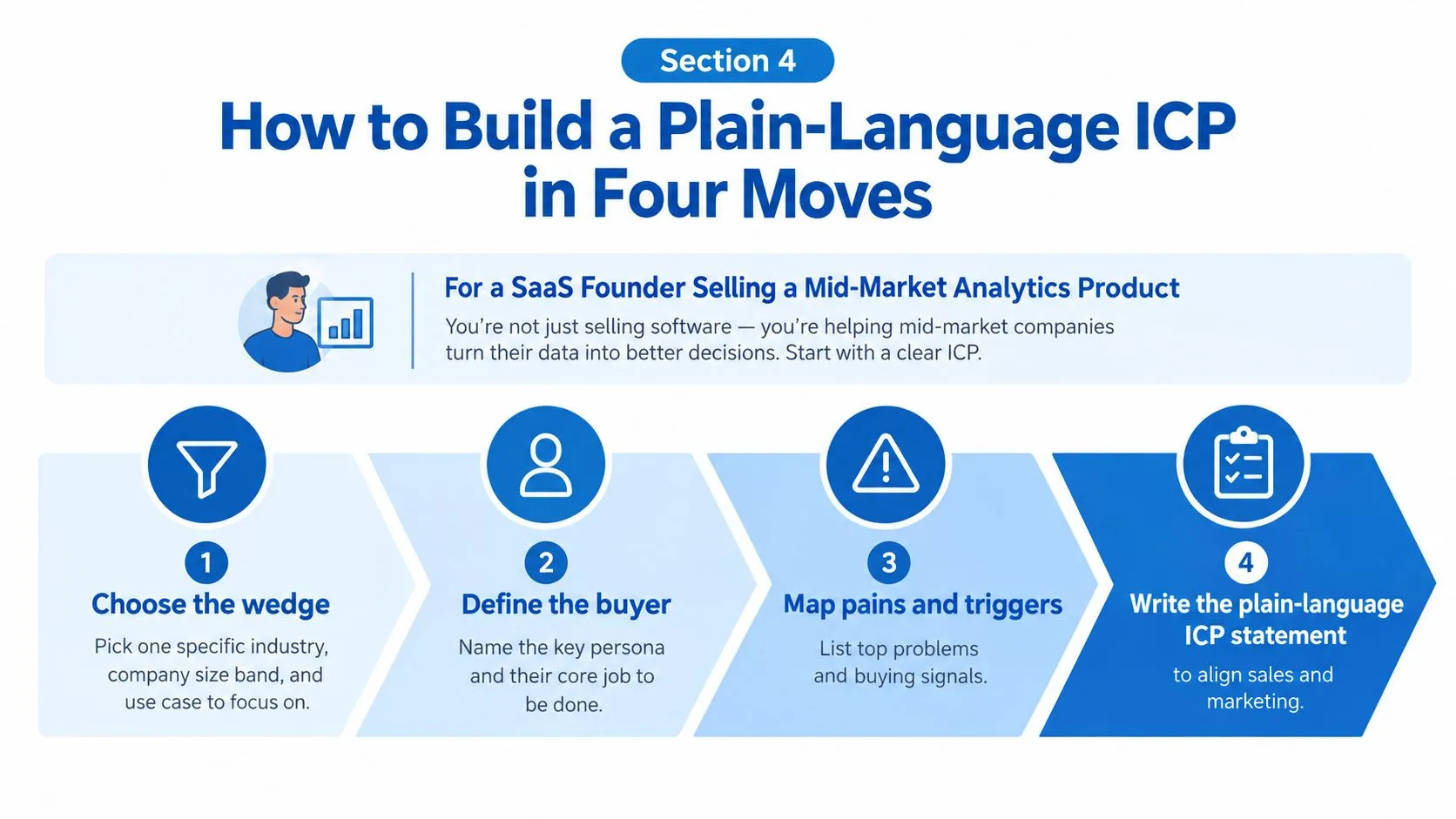
Start with a wedge, not a wish list. A founder selling a mid-market analytics product can’t help everyone, so the first move is choosing the one industry, size band, and use case that already shows signs of traction.
Build the wedge before you add detail
If three of your easiest wins came from software companies with 50 to 200 employees using the product for pipeline reporting, that’s your wedge. Don’t widen it because a larger market sounds more exciting. A sharp wedge gives you something searchable.
Next, add the firmographic layer so the wedge can be found. That means employee count range, revenue band, geography, funding stage, and business model, written in plain language that sales and marketing can both recognize.
Then add the signals that show motion. Current stack, hiring patterns, intent topics, product adoption readiness, and recent triggers such as a funding event or leadership hire all help separate a match from a live opportunity.
Practical rule: if the account fits on paper but nothing has changed recently, keep it lower priority until a signal appears.
Turn the outcome into one sentence
The last move is the one many teams skip. Write a sentence that names the measurable result the buyer wants, the obstacle in the way, and the time frame they care about. That forces the profile to stay tied to value, not just company traits.
A simple version looks like this, “Mid-market software companies with a lean revenue team, using a modern CRM and active sales engagement stack, that need cleaner reporting before scale creates more manual work.” That one sentence can guide targeting, scoring, messaging, and qualification without needing a twelve-page template.
The same logic also fits the way many modern outbound systems work, including LinkedIn-led targeting tools that rely on company fit plus trigger data rather than static lists. The strongest tools in that category turn a plain-language profile into filters and live queues, which is why the description has to be operational, not poetic.
Turning the ICP Into Filters Your Tools Can Run
A plain-language ICP only matters if a tool can act on it. Once you move from strategy to execution, each attribute becomes a filter, a score, or a trigger, and the outbound system can decide whether an account enters the audience.
| ICP Attribute | Tool Filter | Data Source | Weight |
|---|---|---|---|
| Industry | Include specific industry, exclude irrelevant sectors | Company enrichment | Core |
| Headcount | Match target employee range | Firmographic database | Core |
| Geography | Include approved regions, exclude unsupported ones | CRM or enrichment | Core |
| Tech stack | Require or exclude specific tools | Technographic lookup | High |
| Hiring activity | Trigger high-intent queue when relevant roles appear | LinkedIn activity or job data | High |
| Funding or leadership change | Push to priority list when a trigger appears | Public company updates | High |
| Competitor or agency status | Exclude from routing | Internal rules | Negative filter |
What changes once the ICP becomes logic
A filter can do more than sort names. It can rank accounts, push people into separate sequences, and lower the priority of borderline matches until a stronger signal appears. That makes the ICP less like a checklist and more like a living routing system.
Negative filters matter just as much as positive ones. Agencies, competitors, and pre-PMF startups can eat time fast if they’re allowed into the audience by default. The goal isn’t to collect everyone who kind of fits, it’s to protect rep time from accounts that will never convert.
A LinkedIn-led workflow makes this especially important because the outreach moment is tied to public signals, not anonymous site visits. LeadBeast fits that kind of operating model because it qualifies people and companies against a plain-language ICP, then uses those criteria to build live audiences and trigger outreach, as described in its LinkedIn lead generation tooling overview.
A simple translation example
A founder’s plain-language ICP might say, “Mid-market SaaS companies in North America, using a modern sales stack, hiring into revenue roles, and showing signs of reporting pain.”
The tool version becomes, include SaaS, include the target employee range, include North America, require compatible CRM and sales engagement tools, prioritize accounts hiring sales or RevOps, and exclude competitors and agencies. Same idea, different format.
That translation is the whole game. If the tool can’t read the ICP, the ICP can’t shape the queue.
Why the Static ICP Document Is Quietly Failing
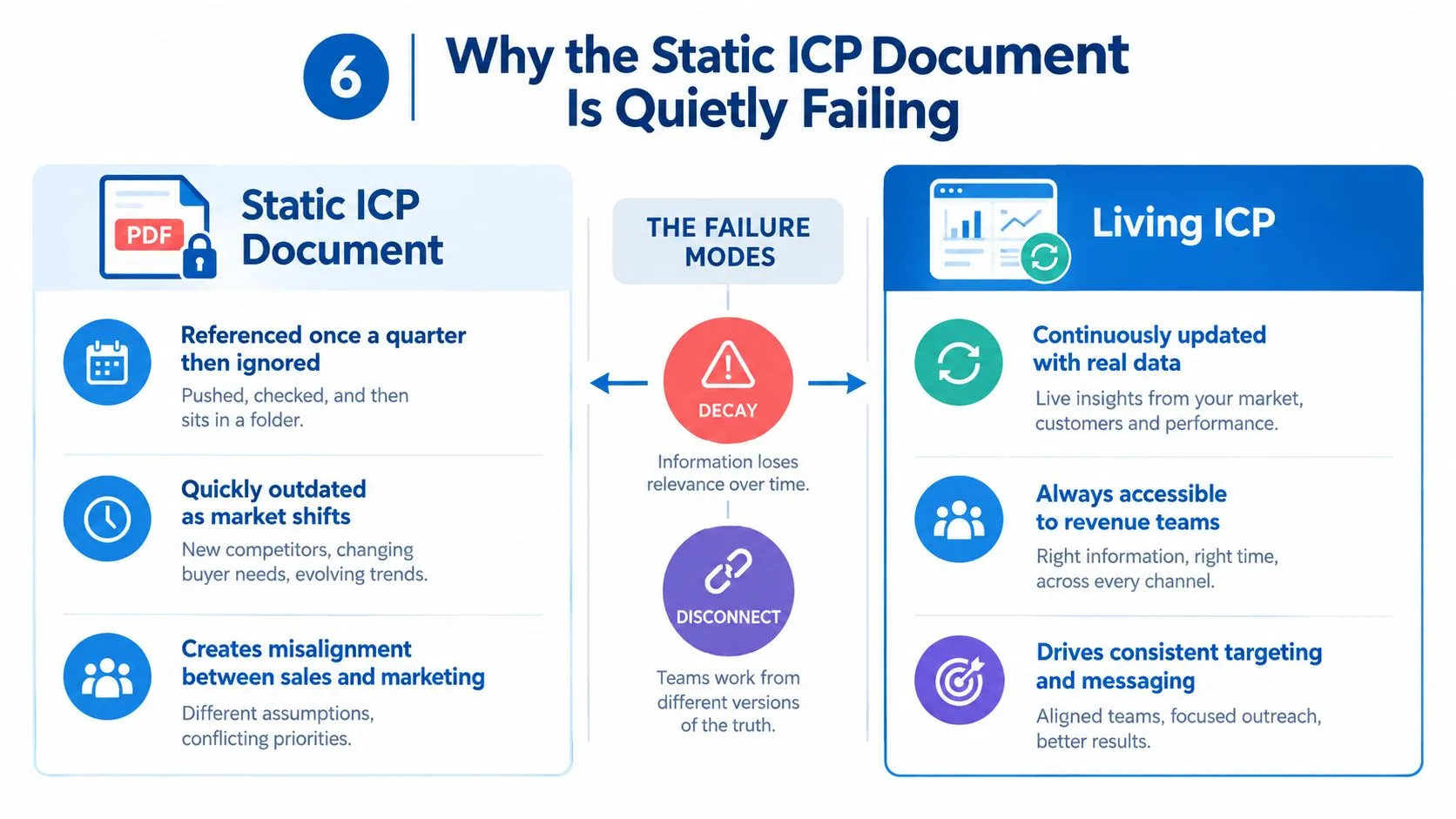
A PDF or slide deck makes the ICP feel finished, but that feeling is misleading. Buying committees shift, stack choices change, and signal patterns move faster than a quarterly review cycle.
Static documents decay in three ways
First, they go stale. The company you could target last quarter may no longer look the same after a hiring spree, a new funding round, or a product change.
Second, they can’t be operationalized cleanly. Outbound tools need structured inputs, not a paragraph that someone has to interpret differently every time they build a list.
Third, they miss timing. The best-fit account on paper can still be a bad target if there’s no trigger, and a borderline fit can become a great target the moment activity shows up.
A living ICP does two jobs at once, it defines the account boundary and it tells the team when the account has become worth contact.
That’s why the better pattern is a living model that combines a plain-language definition with signal logic. It can learn from closed deals and lost deals, then adjust who gets scored up, who gets excluded, and which triggers matter most.
For teams comparing a static list to a signal-led audience, the difference is usually obvious once they look at timing. The intent-signals-versus-static-lists discussion shows why movement matters more than one-time matching when the goal is relevant outreach.
Your First 90 Days With a Living ICP
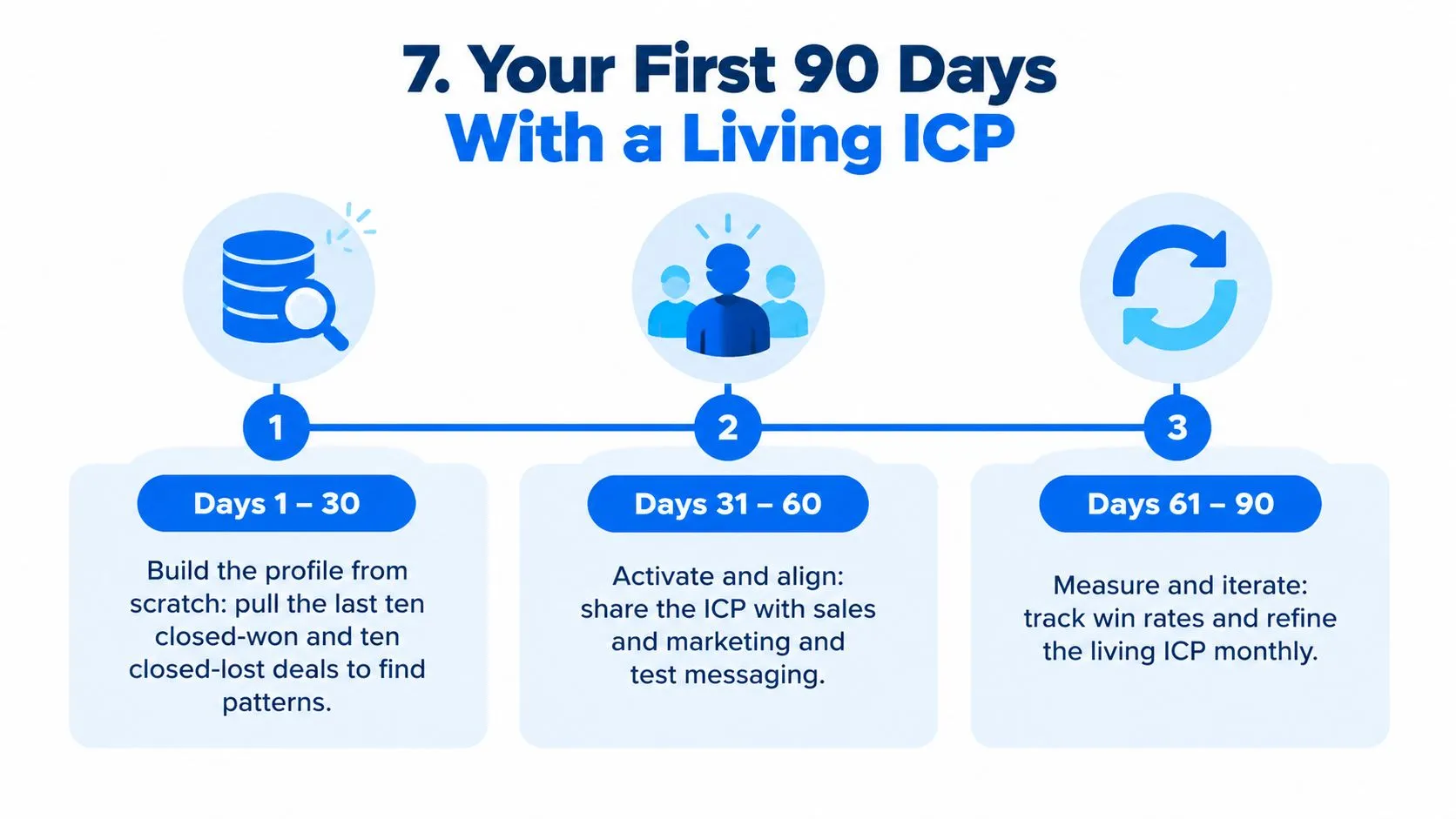
Days 1 to 30 are about evidence, not invention. Pull the last ten closed-won and ten closed-lost accounts, look for shared firmographics and technographics, and write the wedge statement that keeps showing up in your best deals.
The rollout that keeps teams aligned
Days 31 to 60 are for activation. Turn the profile into filters inside your outbound tool, set up lead scoring against the must-have criteria, and test it on a small group of matched accounts before expanding.
Days 61 to 90 are for signal tuning. Add trigger logic, review reply and meeting patterns, tighten the weights, and document the version the whole team should use from that point forward.
A simple checklist keeps the rollout practical:
- Pull deal history: Review the last ten wins and ten losses for common traits.
- Write the wedge: Name the one segment you want to target first.
- Set must-haves: Choose the few firmographic criteria that define fit.
- Add signals: Layer in hiring, funding, stack, and role-change triggers.
- Build the audience: Translate the profile into filters your tool can run.
- Test and refine: Use early replies and meetings to tighten the model.
The point isn’t to make the ICP perfect on day one. The point is to make it usable, then improve it with real market feedback.
If you want a tool that turns LinkedIn activity into a working audience system, LeadBeast is built to qualify people and companies against a defined ICP, detect buying signals, and sync those audiences into outbound workflows. Visit LeadBeast if you want to see how that kind of living ICP logic can fit into your own LinkedIn-led outreach motion.